The Amiga 4000T. Produced in very small numbers in the last few months of Commodore in 1994 before it went bankrupt, and briefly again by Amiga Technologies in 1996. I thought since I had the system opened up to fix an issue with the hard disk and sound output, I would share some photos of this heavily upgraded machine.
This A4000T (PAL Version) was purchased about ten years ago second hand, base setup with no expansions in it. I had to sell a lot of other systems to have the money to get this one, even back then they were pricey!
It is the later Amiga Technologies built version. The dent in the top back was done during shipping the computer to me in Adelaide. I found a big dent in the box on that corner and sure enough...oh well, can't exactly get a new one..
Opening the front cover, I have a DVDROM IDE drive, and 2 SCSI CDROM drives, and just the one high density floppy disk drive, as the IDE hard disk occupies the other blanked slot - it means all the bays are full:
The buttons at the top are power button, Reset button, and Internal speaker output on/off - yes, it has an internal speaker!
Rear view of the A4000T - the case is big, bulky and heavy. A typical PC AT high tower case of that era. Not as bad as a A3000T from what I have been told - never owned or tried to lift an A3000T. The back says Made in Taiwan and the label says Made in the USA...
The A4000T uses multiple module cards for all the I/O ports, rather than being included on the main motherboard, as they are on other Amiga's. In the next shot you can see the SCSI external connector (with DIP switches for the SCSI settings so you don't need to open the case to adjust them).
Below that is the Indivision AGA MK2 DVI out (for native Amiga output graphics), Audio/Video module card with RGB port (not used) native Amiga RCA audio out - which is fed back into the case to be mixed via AUX IN into the PCI sound card output. The PCI sound card has a DSP that can decode MP3's in hardware, meaning the 060 is not needed to playback MP3's! :-)
Moving on is the PCI 10/100 network card, 3dfx Voodoo3 PCI graphics Card (which runs the Workbench screen), and the first of the USB ports connected to the Deneb USB card internally.
Some of the cards are offset because of the PCI bridge board which means the PCI cards are higher than normal...
Because the A4000T has IDE and SCSI support, technically a separate SCSI card or IDE card is not needed.
However, I did add a Buddha IDE Zorro card as I wanted buffered IDE ports to minimise potential damage to the hard disk and provide more IDE ports.
Also installed in the case is a USB Deneb Zorro card (including OS3.9 patches in ROM for one boot to bootup), and a IDE 320GB Hard disk (running SFS partitions).
Opening the case reveals a labyrinth of cables - the SCSI cable is stretched to it's limit to reach both CDROM drives, positioned over the Cyberstorm 060 accelerator with 64MB memory. I have 128MB in my A4000D Cyberstorm 060 card but I never needed to transfer it to this machine so far...
View from the bottom shows the Mediator PCI A4000T bridge board which adds many PCI slots to the Amiga 4000T whilst still allowing most Zorro slots to be used as normal (zorro riser is needed in some cases depending on what cards you have) - you can also see the PCI sound card and 3dfx card in this shot:
I was pleased that after just reseating everything inside the A4000T, the machine worked as normal again and the issues I was having with the hard disk booting and sound output just went away! I was very happy it wasn't more complicated!
This system runs AmigaOS 3.9 BoingBag 2 with AmigaSYS4 AGA.
One TFT display is to show the 1280x1024 resolution 24 bit colour Workbench, and the other TFT screen to output the scan doubled Indivision AGA native Amiga graphics for WHDLoad games and of course the many Amiga demos I have
Never did understand why they chose "Best Available" instead of putting AGA under the Chip type in the Early startup menu Display options...anyway!
I used to have the PicassoIV in this system (which passes through Amiga native graphics output scan doubled plus it's modes via one VGA connector) so only one screen was needed, but having the 3dfx Voodoo3 PCI gives me higher resolutions in more colours.
It allows me to run AFA for AOS too which gives me anti-aliased fonts on the Workbench, a lovely AmigaOS4 theme, and png icon support too! :-)
The A4000T is the result of a lot of hard work over a lot of years to build up to this, and it is still a lot of fun to use in 2015! I don't think I could ever sell it!
Showing posts with label SCSI. Show all posts
Tuesday, 18 August 2015
Saturday, 16 August 2014
CDTV - Installing SCSI Controller and AztecMonster
Today I wanted to take a look at the SCSI Controller expansion (by CBMChef) for the CDTV and the AztecMonster CD SCSI card (and a quick look at an A2000HD too):

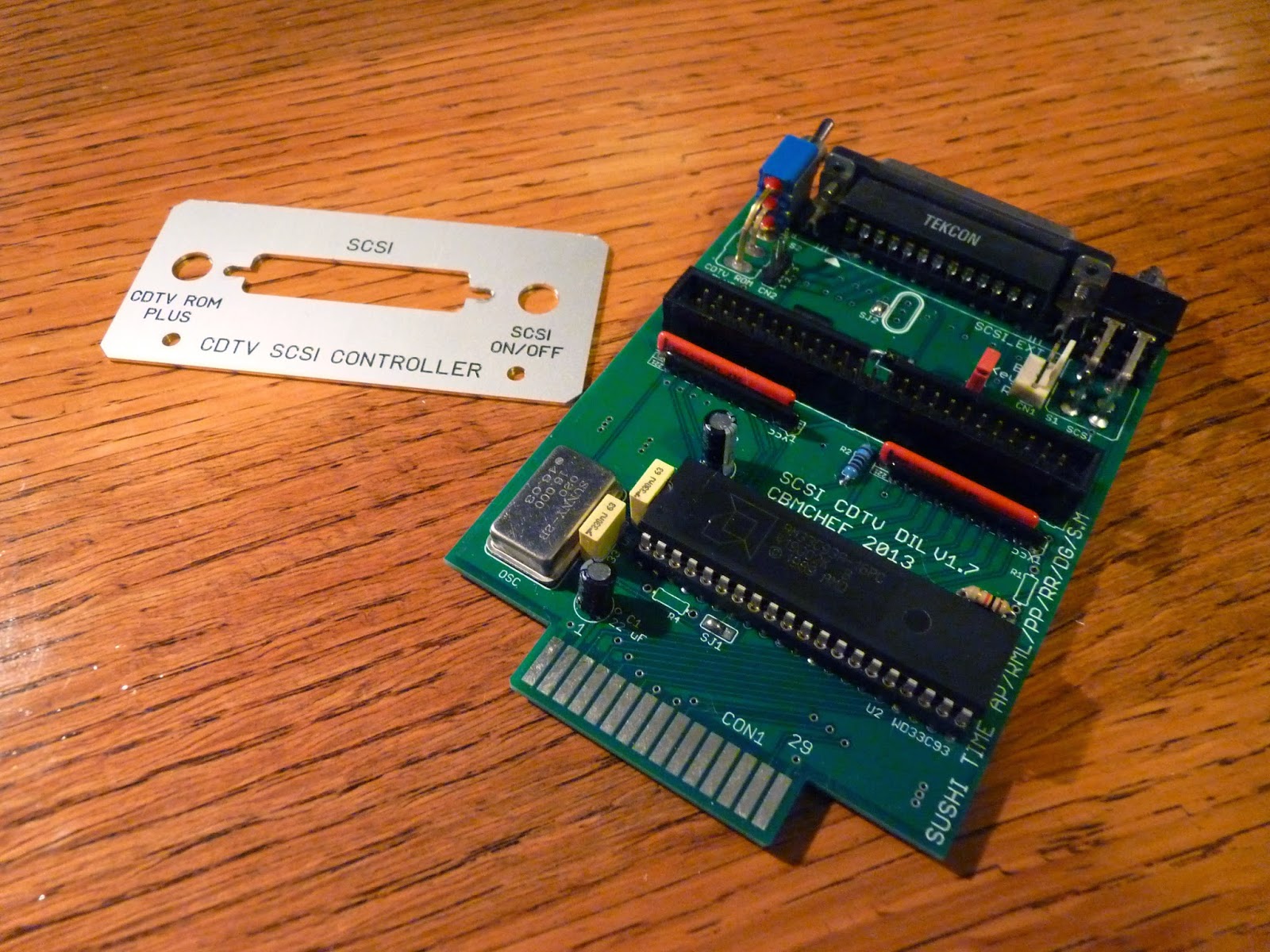
Above you can see the CDTV SCSI Controller as delivered. I bought it brand new from Ebay. It comes with a CDTV backplate for securing it to the back of the CDTV expansion slot.
On the board itself you can see it was made in 2013, with the interesting the Sushi Time writing on the side, SCSI controller chip, and internal SCSI connector.
Below you can see the rear view showing the external DB25 scsi connector, and two switches - one for enabling/disabling the SCSI controller, and one for switching between different kickstart ROM chips if you have a kickstart ROM switcher installed (which I don't):
There is also a connector for the SCSI disk activity which is suggested in the instructions can be combined with the disk activity light for the CDTV drive - I lack the suitable skills to do this though!
Here is the backplate now attached to the Board. As you can see, the board is actually inserted upside down into the CDTV:
Below you can see the expansion slot (I have removed the cover) on the CDTV, ready for the SCSI controller expansion card to be installed:
As a curiosity I also removed the CDTV case to take a look inside - I quickly saw that installing a 3.5 inch SCSI hard disk internally is not possible - there is simply no room for it:
Another view from the rear of the case, a bit closer (you can click to expand these photos):
This is the view from the front of the case towards the back:
A closeup of the Revision 2.2.1 that this particular CDTV is - it is a bit dusty as you would expect:
Here is the SCSI Controller now installed into the expansion slot on the CDTV:
Next to the SCSI Controller is the RF and Composite Video out. As a point of interest this is also an expansion slot module. I assume you could take this out and put another expansion in if you desired it!
Given the constraints of the space inside the CDTV case, the expectation is that hard disks will be mounted in an external case and connected to the DB25 external scsi connector. However, there is still an internal 50 pin SCSI connector, and this got me thinking...
I found a potential solution in the AztecMonster - a 3.5 inch form factor SCSI to CF card converter card from Japan. It is designed to be used in old 68k Macintosh computers and AKAI sampling machines. It has been used in some Amiga setups too, although I also saw plenty of people had trouble with them also.
I decided to take the gamble and order one. Only the Japanese would call such a card an AztecMonster :-)
Here it is, the AztecMonster card, brand new, as delivered from Japan, with instruction sheet:
Some views of the AztecMonster Card. Here you can see the 50 pin SCSI connector and Molex power connector:
Here is a view from the other side of the card, showing the CF Card slot:
I added a 4GB CF Card that I prepped in WinUAE following instructions I found on the internet here to prep the card for Amiga use:
Hmm, AztecMonster and CDTV - A potential good match:
Next I partly removed the SCSI controller from the Expansion bay, so I could connect an internal 50 pin SCSI cable to it:
Here you can see the internal SCSI connector:
And here is the scsi cable connected to it:
The intention is that if I can get this working, I will install a molex power splitter on the CD drive to power the AztecMonster and have it all mounted internally, as the AztecMonster is very slim and will fit inside.
But for testing purposes I ran the SCSI cable outside the CDTV and used an external molex power supply to power the AztecMonster for testing:
Here it is, now all hooked up, but unfortunately I just get the CDTV boot screen - the hard disk does not boot at all:
Next up, I tried connecting a real Amiga 2000 SCSI hard disk to the CDTV via the same SCSI cable and using the external molex power. It worked perfectly. The CDTV booted the Workbench 1.3 from Hard disk and here it is multitasking the Amiga Boing Ball demo and the workbench:
Closer view of the real SCSI hard disk working on the CDTV:
So the SCSI Controller expansion works well, but doesn't work with the AztecMonster.
Hmmm.....
So next, I decide to dust off my trusty Amiga 2000, and connect the AztecMonster to the SCSI controller on that to see what is happening.
I have owned this Amiga 2000HD since we bought it new back in 1991 in Perth. I have done a lot of projects with this computer over the years...
At the moment it has 8MB Fast RAM, 68030 Accelerator with MMU and FPU, two floppy drives, once SCSI Drive, and a 1GB SCSI hard disk installed. I opened up the case since I need access to the SCSI controller:
Here is a close up view of the twin floppy drives and CDROM drive. I picked the CDROM drive from an old Digital AlphaServer as the colour of the CDROM drive closely matches the A2000 drives and case. I had to change the original floppy drives when they failed a few years ago. These ones below I got from another A2000 I picked up, and scavenged spare bits for just this kind of occurrence:
Closer view of the 8-Up RAM Card and and A2091 SCSI Controller:
In this Amiga 2000HD I have three kickstart ROMS on a switcher - v1.3, 2.05 and 3.1. The switcher is operated by a switch on the back of the Amiga 2000. I also have a Indivision ECS installed in here, as well as a MegaAChip giving 2MB of CHIP memory. The foam prevents the kickstart switcher moving around - not elegant but it works:
Next up, I disconnected the SCSI CDROM drive and connected the AztecMonster to the A2000:
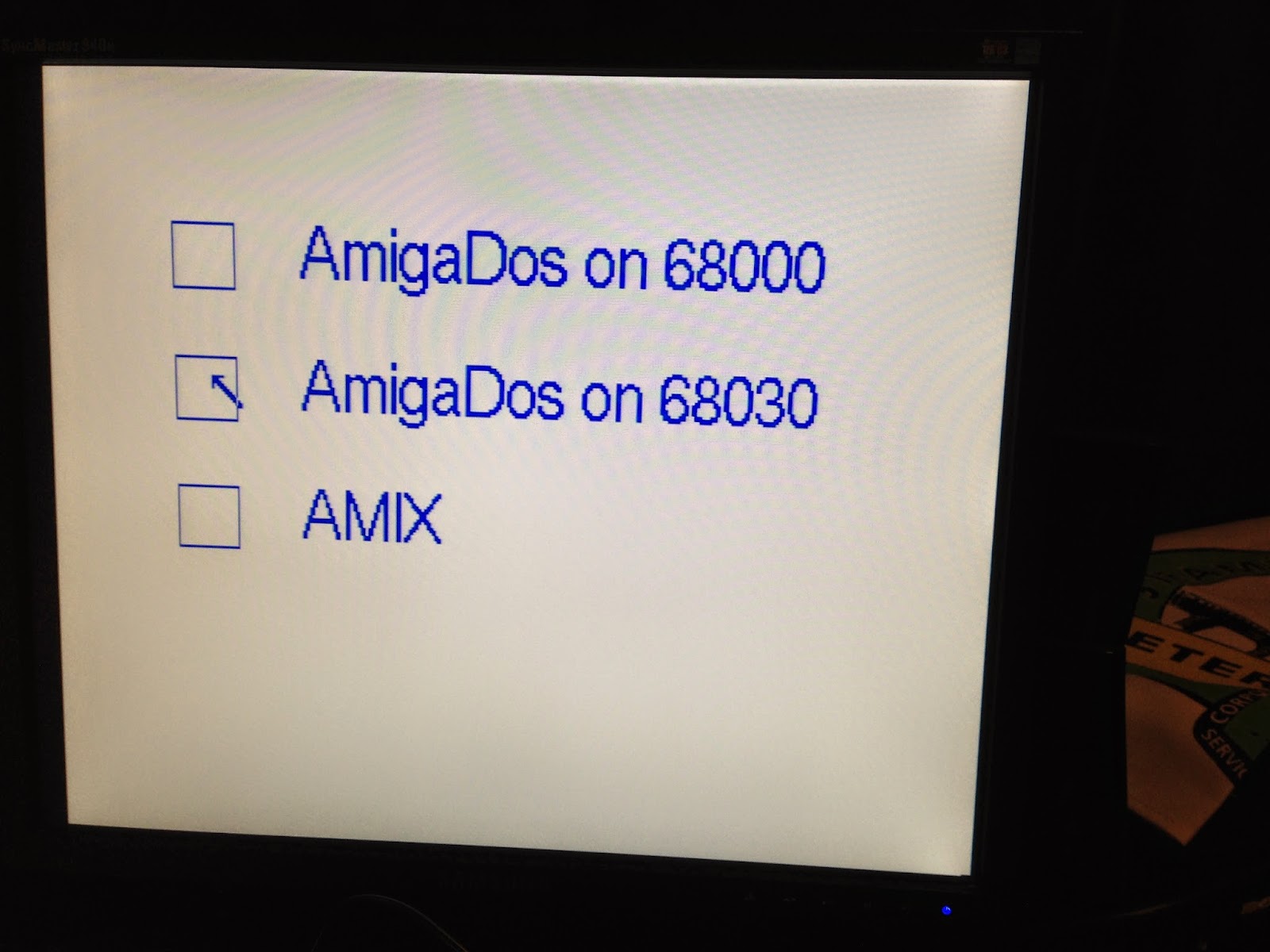
I choose to boot using v1.3 as I have a dual partition setup on my A2000 SCSI hard disk. I can boot into v1.3 or 3.1. On power on, I can choose whether to use the 68000, 68030 or run AMIX. AMIX is the commercial Unix variant Commodore released on the seldom seen A3000UX system, but AMIX is also able to run on this system - although I have not tried it out:
Here is my A2000 booting Workbench 1.3 - I created a boot screen using Deluxe Paint 2, since it doesn't normally have a boot screen and I wanted one:
Here is my highly customised Workbench 1.3 desktop when booting is finished:
I run an Amidock style launcher in the bottom left, SID 2 (file manager like DOPUS) is running in iconify mode, ready to launch when needed. Also running interlace screen mode (flicker fixed by the Indivision ECS) for more desktop space, and using a program called SimGen to change the background to a picture and blank the borders around the Workbench screen.
I also have a tbar program to change the window icons and title bar pattern, and a more detailed memory information in the Workbench toolbar. There is a lot more too of course, but I spent a lot of time to get this setup on Workbench 1.3. I transferred this hard disk partition setup for use in Amiga emulators, and also under AmigaOS4.1 on the X1000 too.
Anyway, back to the AztecMonster. I run up HDToolbox, which turns on the HD light and freezes while trying to detect the drives:
I tried modifying the jumpers on the AztecMonster to use different SCSI ID's, turn off the automatic SCSI termination (powering off each time of course), but I got the same result every time.
So next, I switched over to using the v3.1 kickstart ROM, and use the early boot menu to choose the other partition to boot into AmigaOS3.9:
Originally I had a Picasso II card installed to have a much nicer screen mode for AmigaOS3.9, but the 2MB memory in it removes 2MB from the 8MB Fast RAM in the A2000, which is bad for running AmigaOS3.9...I really need CPU card memory expansion to have more memory...
In any case, I tried running the HDToolbox here and the same issue - freezes on detection:
I next tried using the Amiga 600 CF Card in the AztecMonster, which I know works on the Amiga, but no go either.
Looks like the AztecMonster doesn't work on my Amigas...
I already spent a lot of time trying to get it to work, and have to conclude that it doesn't. I noted other people had similar lock up troubles - some got it working too but I just don't see what else I can try at this point.
For now though, I proved that I can get SCSI hard disks working on the CDTV, booting a normal Workbench 1.3 system and running programs on it. Although it is not the perfect solution I was hoping for with the AztecMonster, the SCSI controller expansion card does work well on the CDTV!
Above you can see the CDTV SCSI Controller as delivered. I bought it brand new from Ebay. It comes with a CDTV backplate for securing it to the back of the CDTV expansion slot.
On the board itself you can see it was made in 2013, with the interesting the Sushi Time writing on the side, SCSI controller chip, and internal SCSI connector.
Below you can see the rear view showing the external DB25 scsi connector, and two switches - one for enabling/disabling the SCSI controller, and one for switching between different kickstart ROM chips if you have a kickstart ROM switcher installed (which I don't):
There is also a connector for the SCSI disk activity which is suggested in the instructions can be combined with the disk activity light for the CDTV drive - I lack the suitable skills to do this though!
Here is the backplate now attached to the Board. As you can see, the board is actually inserted upside down into the CDTV:
Below you can see the expansion slot (I have removed the cover) on the CDTV, ready for the SCSI controller expansion card to be installed:
As a curiosity I also removed the CDTV case to take a look inside - I quickly saw that installing a 3.5 inch SCSI hard disk internally is not possible - there is simply no room for it:
Another view from the rear of the case, a bit closer (you can click to expand these photos):
This is the view from the front of the case towards the back:
A closeup of the Revision 2.2.1 that this particular CDTV is - it is a bit dusty as you would expect:
Here is the SCSI Controller now installed into the expansion slot on the CDTV:
Next to the SCSI Controller is the RF and Composite Video out. As a point of interest this is also an expansion slot module. I assume you could take this out and put another expansion in if you desired it!
Given the constraints of the space inside the CDTV case, the expectation is that hard disks will be mounted in an external case and connected to the DB25 external scsi connector. However, there is still an internal 50 pin SCSI connector, and this got me thinking...
I found a potential solution in the AztecMonster - a 3.5 inch form factor SCSI to CF card converter card from Japan. It is designed to be used in old 68k Macintosh computers and AKAI sampling machines. It has been used in some Amiga setups too, although I also saw plenty of people had trouble with them also.
I decided to take the gamble and order one. Only the Japanese would call such a card an AztecMonster :-)
Here it is, the AztecMonster card, brand new, as delivered from Japan, with instruction sheet:
Some views of the AztecMonster Card. Here you can see the 50 pin SCSI connector and Molex power connector:
Here is a view from the other side of the card, showing the CF Card slot:
I added a 4GB CF Card that I prepped in WinUAE following instructions I found on the internet here to prep the card for Amiga use:
Hmm, AztecMonster and CDTV - A potential good match:
Next I partly removed the SCSI controller from the Expansion bay, so I could connect an internal 50 pin SCSI cable to it:
Here you can see the internal SCSI connector:
And here is the scsi cable connected to it:
The intention is that if I can get this working, I will install a molex power splitter on the CD drive to power the AztecMonster and have it all mounted internally, as the AztecMonster is very slim and will fit inside.
But for testing purposes I ran the SCSI cable outside the CDTV and used an external molex power supply to power the AztecMonster for testing:
Here it is, now all hooked up, but unfortunately I just get the CDTV boot screen - the hard disk does not boot at all:
Next up, I tried connecting a real Amiga 2000 SCSI hard disk to the CDTV via the same SCSI cable and using the external molex power. It worked perfectly. The CDTV booted the Workbench 1.3 from Hard disk and here it is multitasking the Amiga Boing Ball demo and the workbench:
Closer view of the real SCSI hard disk working on the CDTV:
So the SCSI Controller expansion works well, but doesn't work with the AztecMonster.
Hmmm.....
So next, I decide to dust off my trusty Amiga 2000, and connect the AztecMonster to the SCSI controller on that to see what is happening.
I have owned this Amiga 2000HD since we bought it new back in 1991 in Perth. I have done a lot of projects with this computer over the years...
At the moment it has 8MB Fast RAM, 68030 Accelerator with MMU and FPU, two floppy drives, once SCSI Drive, and a 1GB SCSI hard disk installed. I opened up the case since I need access to the SCSI controller:
Here is a close up view of the twin floppy drives and CDROM drive. I picked the CDROM drive from an old Digital AlphaServer as the colour of the CDROM drive closely matches the A2000 drives and case. I had to change the original floppy drives when they failed a few years ago. These ones below I got from another A2000 I picked up, and scavenged spare bits for just this kind of occurrence:
Closer view of the 8-Up RAM Card and and A2091 SCSI Controller:
In this Amiga 2000HD I have three kickstart ROMS on a switcher - v1.3, 2.05 and 3.1. The switcher is operated by a switch on the back of the Amiga 2000. I also have a Indivision ECS installed in here, as well as a MegaAChip giving 2MB of CHIP memory. The foam prevents the kickstart switcher moving around - not elegant but it works:
Next up, I disconnected the SCSI CDROM drive and connected the AztecMonster to the A2000:
I choose to boot using v1.3 as I have a dual partition setup on my A2000 SCSI hard disk. I can boot into v1.3 or 3.1. On power on, I can choose whether to use the 68000, 68030 or run AMIX. AMIX is the commercial Unix variant Commodore released on the seldom seen A3000UX system, but AMIX is also able to run on this system - although I have not tried it out:
Here is my A2000 booting Workbench 1.3 - I created a boot screen using Deluxe Paint 2, since it doesn't normally have a boot screen and I wanted one:
Here is my highly customised Workbench 1.3 desktop when booting is finished:
I run an Amidock style launcher in the bottom left, SID 2 (file manager like DOPUS) is running in iconify mode, ready to launch when needed. Also running interlace screen mode (flicker fixed by the Indivision ECS) for more desktop space, and using a program called SimGen to change the background to a picture and blank the borders around the Workbench screen.
I also have a tbar program to change the window icons and title bar pattern, and a more detailed memory information in the Workbench toolbar. There is a lot more too of course, but I spent a lot of time to get this setup on Workbench 1.3. I transferred this hard disk partition setup for use in Amiga emulators, and also under AmigaOS4.1 on the X1000 too.
Anyway, back to the AztecMonster. I run up HDToolbox, which turns on the HD light and freezes while trying to detect the drives:
I tried modifying the jumpers on the AztecMonster to use different SCSI ID's, turn off the automatic SCSI termination (powering off each time of course), but I got the same result every time.
So next, I switched over to using the v3.1 kickstart ROM, and use the early boot menu to choose the other partition to boot into AmigaOS3.9:
Originally I had a Picasso II card installed to have a much nicer screen mode for AmigaOS3.9, but the 2MB memory in it removes 2MB from the 8MB Fast RAM in the A2000, which is bad for running AmigaOS3.9...I really need CPU card memory expansion to have more memory...
In any case, I tried running the HDToolbox here and the same issue - freezes on detection:
I next tried using the Amiga 600 CF Card in the AztecMonster, which I know works on the Amiga, but no go either.
Looks like the AztecMonster doesn't work on my Amigas...
I already spent a lot of time trying to get it to work, and have to conclude that it doesn't. I noted other people had similar lock up troubles - some got it working too but I just don't see what else I can try at this point.
For now though, I proved that I can get SCSI hard disks working on the CDTV, booting a normal Workbench 1.3 system and running programs on it. Although it is not the perfect solution I was hoping for with the AztecMonster, the SCSI controller expansion card does work well on the CDTV!
Subscribe to:
Posts (Atom)