Showing posts with label epsilon. Show all posts

Sunday, 3 December 2017

My Amiga Blog is back in business!

Hi All,

I am pleased to say that my study is finished for the year and exams done too as of today! This of course means that I can now return to my blog again!


It's good to be back.

It has not been an easy time for me since I stopped the blogs back in July. My father in law passed away suddenly in Japan in mid August which meant stopping everything to go to Japan to arrange and attend the funeral. It has been tough for my wife to deal with, being so far away from Japan and not being able to say goodbye.

In addition I have been quite unwell over the past few months, culminating in an emergency ambulance to hospital last month and a not so fun visit to the emergency room and lots of tests and pain pills. Fortunately things are on the improve and I feel considerably better now.

I have been studying when I have not been working, juggling that with my Adelaide Retro Computing Group responsibilities, continuing to help organise and run the monthly meetings.

Unfortunately it seems that the December 2017 Adelaide Retro Computing Group meeting may well be the last one. :-(

The other two organisers have decided to stop being involved from the end of this year, which leaves just me to carry on the groups activities. Given my health issues and lack of free time to take on running it by myself, I was left with no choice but to close the group down with the last meeting coming up this Friday December 8th. Hopefully we can see some of you there! I never say never of  course, and if someone is able to commit to help running the events for at least 12 months then maybe we can find a way to continue in 2018. We'll see how that pans out.

Just because I have been busy (and off air) does not mean I have been idle on all things Amiga. Far from it.

Those who follow my Facebook, Twitter and Instagram accounts will know I have continued to muck around with my Amigas still during this period when time allowed. I also mucked around a bit with my new FM Towns system too, but that is not really relevant to this blog so...

There have been some great Amiga demos released this past few months on the Classic Amiga, both AGA and OCS/ECS demos!

I have also continued my AmigaOS 4.1 Final Edition beta testing duties on the new AmigaOne A1222, but unfortunately can't discuss that since that work is covered under NDA.

I recently wanted to get the Vampire 500 V2 into my Amiga 500, but that meant fixing the Amiga 500, which has not worked since the last time I tried to use the Vampire in it...heh.
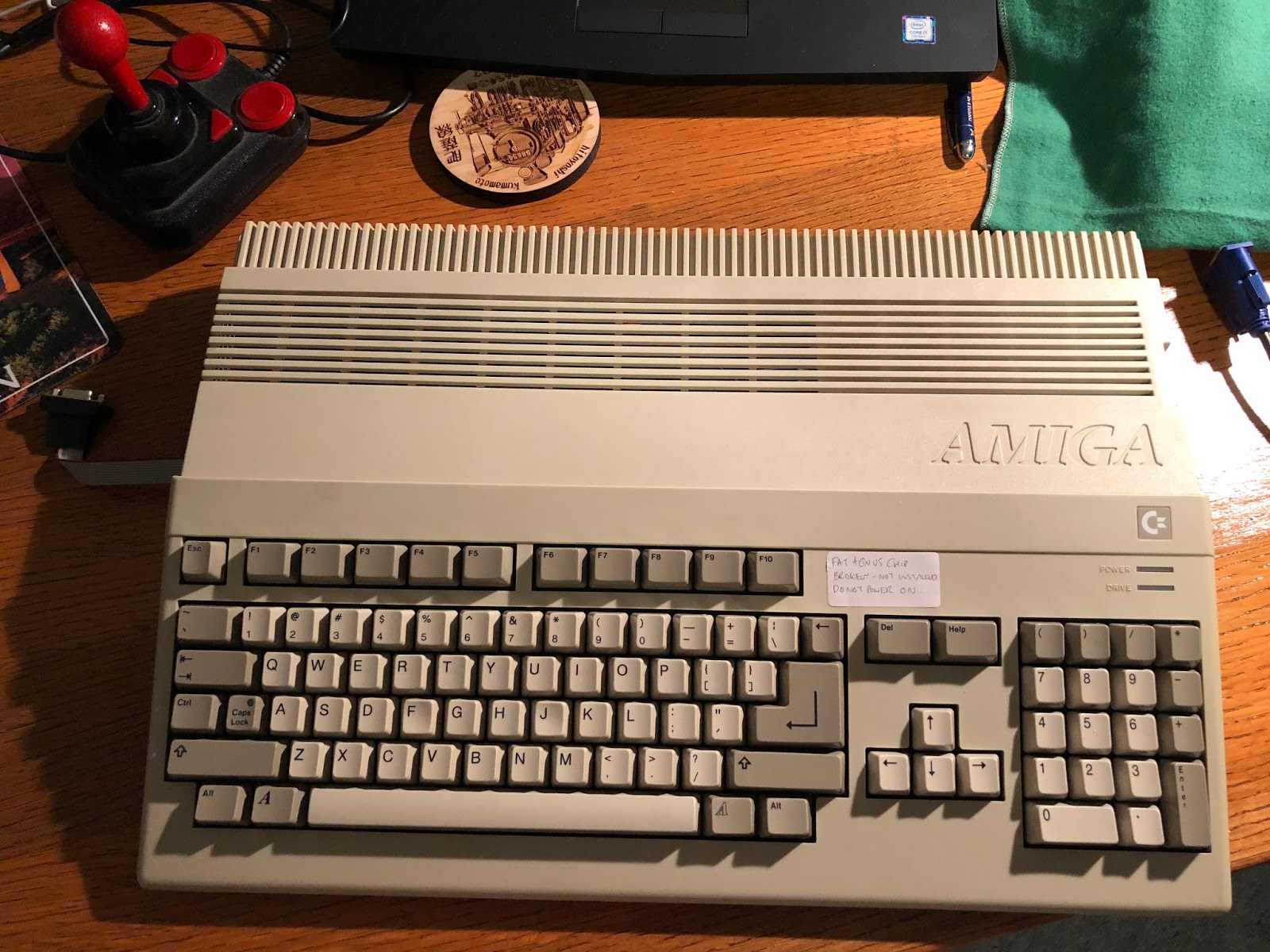

While mucking around with troubleshooting that, I reseated all the chips, and unfortunately managed to break some of the pins on the fat agnus chip when removing it! Argh! So the A500 went into storage until I could source another one.


Finally though I managed to get another one from Germany recently, so I pulled apart the A500 again to hopefully get it working:


My Amiga 500 has an Indivision ECS installed, as well as a gotek mounted on a 3D printed floppy chassis that is designed to fit the A500 case without any modifications:


Here is the missing Fat Agnus chip location:


Here it is with the new Fat Agnus chip installed:


Unfortunately though, the system still doesn't boot and work as expected. Green screens, red screens and black screens, with no idea what the issue is yet... I tried changing the CPU, the kickstart roms and even installed the Vampire 500 V2 again minus the cpu and kickstart roms but no joy as yet. Sigh, back into storage for now until I can come up with another way to fix it or replace the motherboard. Looking like that path is more likely...

So I hooked up the Amiga 600 to make sure it was still working and put it all back together as a complete system again. Here it is working great:


Back in August 2017 at the Adelaide Retro Computing Group meeting, some friends and I organised a two player null modem link up between my Amiga 2000HD and a friend's Amiga 4000D. It made for a lot of fun that night, although being beaten so badly at link up two player Stunt Car Racer made me feel very embarrassed - I thought I was good at that game! At least I won at Lotus 2 and Vroom :-)
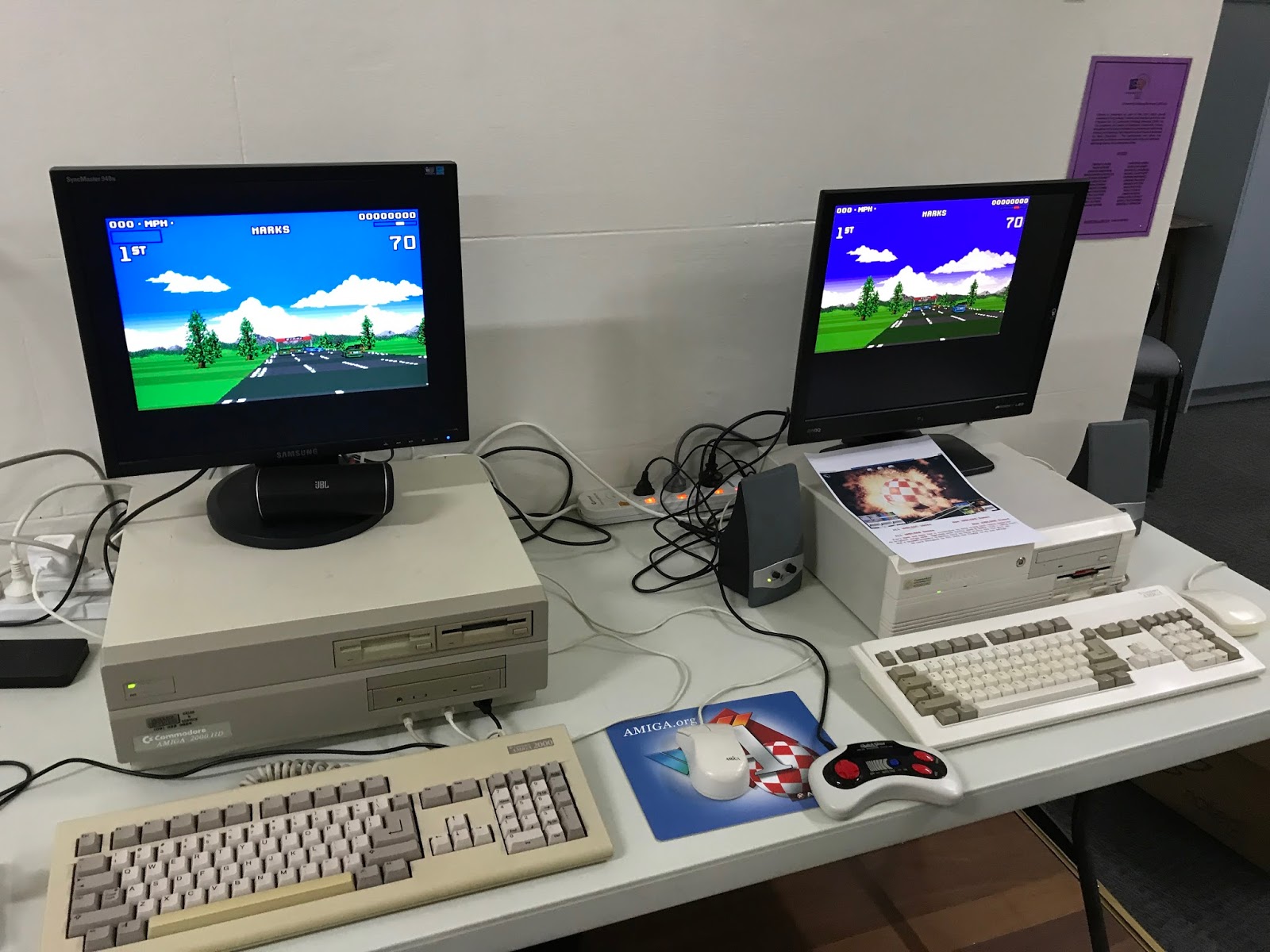


As you may recall my Amiga 2000HD was downgraded from the Vampire installation that was in it before, and now has a 68030 accelerator and 68882 FPU, 128MB fast memory, Picasso II RTG AmigaOS 3.9 BB2 Workbench, Rapid Road USB installed on X-Surf 100 network card, Prisma Megamix card, MegAChip (2MB CHIP), Oktagon SCSI card with 1GB HD (need to upgrade that still), SCSI CDROM, Indivision ECS and kickstart switcher 1.3/2.0/3.1. Whew. :-)

The Amiga 4000D here next to my A2000HD is not mine, but does have the new MNT VA2000 RTG Zorro graphics card installed, 060 and plenty of other goodies too:


Let's take a closer look at the MNT zorro RTG graphics card, with scan doubled pass through native Amiga display addon with HDMI output:


Meanwhile, reviewing on things that happened since the blog stopped, back in July 2017 I replaced the CDTV SCSI card module I bought a long time ago now (and had plenty of issues with it too) with a new one I found on Ebay. This one works a lot better and much more consistent - the old one is on the left, the new one on the right:


The new one is a lot simpler on board as you can see:


It still has the internal SCSI cable, as well as the external SCSI connector, and a SCSI card disable switch.


I hooked up my old Amiga 2000HD 52MB SCSI hard disk to it and it worked perfectly - here playing some mods using Octamed Professional v3 on the hard disk:


Of course I soon got distracted, playing Psygnosis demo CD, and some music too - the CDTV is so great for CD playback:


I also tried out my Defender of the Crown Extended Collector Edition CDTV version (not pictured).


I got into playing Xenon 2 Megablast, the CDTV version. The audio is fantastic on this compared to the original Amiga version. As a big fan of Bomb the Bass, I was glad to finally here the remixed versions of their Megablast (Hip Hop On Precinct 13) included on the CDTV version:


I received a spare Amiga 4000D from a friend in Sydney that has been tower converted (not working) with a number of interesting expansions, including the rare Picasso IV Paloma add on! :-)


This A4000D has been towerised in a Dell Inspiron desktop case from the late 1990's with plenty of modifications.


Cyberstorm 060 accelerator with 128MB memory and the optional SCSI addon installed, connected to the SCSI Hard disk and SCSI CDROM:


Also installed is a USB v1 zorro card I haven't seen before, with the Picasso IV Paloma and PVE 2.0 expansion installed:


Once the daughterboard and cards are removed (difficult job given they were mounted into a customised cage, you can see the Amiga 4000D motherboard, 16MB memory, along with a Varta battery installed. Argh! Get that off quick! (Yes, I did...)
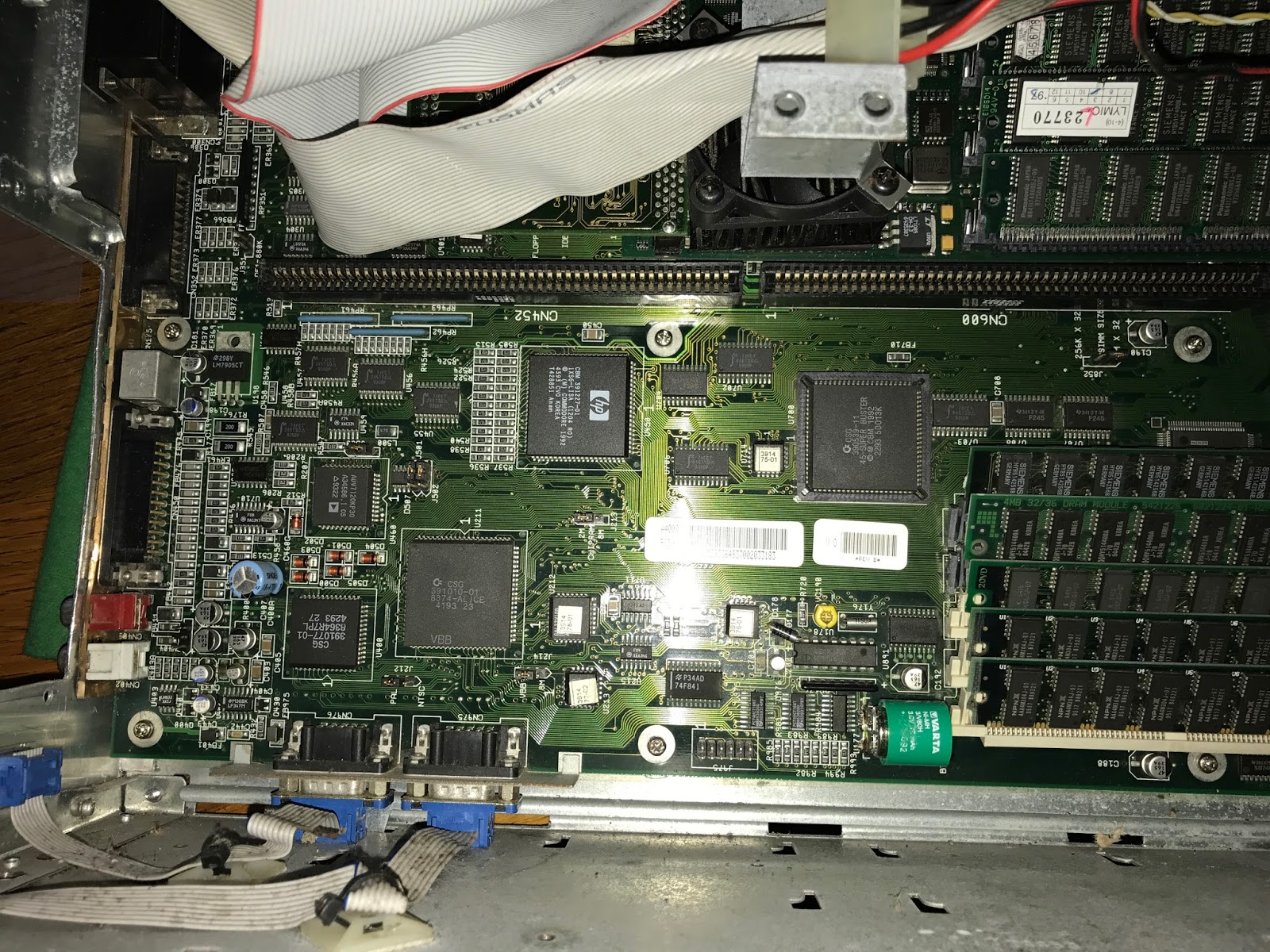

You can see the mouse/joystick extension cables to route the A4000D ports on the motherboard to new locations on the rear of the case, since they would otherwise be completely inaccessible.


Unfortunately although this system looks impressive and powers on, there is nothing appearing on the screen and does not boot. I have stripped it of all non-essential boards and still nothing. I have tried a known working cyberstorm 060 and even the original Commodore 040 accelerator board from my own A4000D but no go...guess this one also goes into the too hard basket for now.

Just to prove that not everything Amiga related is Classic Amigas, I also installed the updated Enhancer v1.3 software package from A-EON Technology on my AmigaOne X1000.


I enjoyed greatly the updated PTP functionality in Enhancer on AmigaOS 4.1 Final Edition Update 1, which allows me to transfer my photos and videos from my iPhone 7 to my X1000!


I have to say this is a really big step forward on AmigaOS 4.1 final Edition Update 1, thanks to Enhancer - it works great:


Here it is showing previews of the photos on my iPhone, allowing me to select the photos for transferring to my X1000:


Here is the transfer underway. And yes, I do have a lot of photos on my iPhone!


 I also played around with the new updated Radeon HD and Warp3D Nova drivers, enjoying the live workbench cube demonstration, which has a rotating cube with each face containing a live view of my Workbench screen. As I move the mouse and windows around, it updates on the cube in real time. Very cool:


Last but not least, I also played around with the updated E-UAE with SDL RTG support, which allows me to get full screen 1920x1080 emulated Workbench OS3.9 on my X1000:

Here is the lines highlighted in the E-UAE configuration file .uaerc I had to modify to get the RTG card support, which I could then setup through Picasso 96 under the emulated OS3.9 installation on the X1000:


Here is the resulting 1080p AmigaOS3.9 emulated Workbench screen on my X1000. I could switch easily between it and the normal AmigaOS 4.1 Final Edition Update 1 screen with the Amiga-M/N keyboard combination.


Well that should bring up mostly up to speed with what I have been up to during my time away. I did installed a replacement RapidRoad USB into the X-Surf 100 on my Amiga4000D system too, and finished the reinstall of the Amiga 1200 system hard disk, which I have been enjoying many 030 AGA demos as I have been typing this entry tonight!

Oh, and I recently tweaked the appearance of this Amiga blog, using a new theme Blogger has available now that looks much more modern. Still finding my way around it (having some trouble with the image on the left which doesn't auto size right for some reason) and expect to tweak it some more still. Happy to receive feedback on what works well and what doesn't.

I will hopefully do a few more blog entries before the Xmas break. Stay tuned!


Wednesday, 30 September 2015

The loss of my friend Mark

Last night (September 29) a close friend of mine, Mark Thompson passed away. He is known in the Amiga scene by his demo scene handle Axon of The Experience, a Classic Amiga demo group I formed in the late 1990's in Adelaide during our university days. We wrote 2 AGA demos and Mark wrote another separate intro in Assembler for Amiga 1200/030 systems.


Every week we would have coding sessions in his dorm room on our Amiga 1200's, with some of our Amiga owning friends at Uni also involved in the demo group at that time. We would always have too much drinks and fish & chips from the Blue & White cafe in North Adelaide after a heavy night coding...we attended the Coven demo parties at Adelaide Uni for a few years in 1995/1996/1997.

Together we wrote a hurried demo for Coven 1997 (Adelaide demo party) called "TLA" (which couldn't be included in the compo because it was PC only!) and also another demo called "Terminal" for Remedy 1998 where it finished 4th. It was a lot of fun.  Mark not only did the coding but also some graphics work on the Amiga too, like making 3D objects and even the TLA logo below.

 
We all had (and still have) huge respect for the Amiga demo groups who produced and continue to produce amazing demos for Amiga even today.

We knew we had no hope of emulating that but we tried anyway, and thanks to Mark's amazing coding skills in Assembler we produced the demo called "Terminal" in 1998 which I am still very proud of working on. I still have all the source code to the two demos, not that I can do anything with them nowadays.

The demos, some music and source code for TLA are still available on Aminet today from when we uploaded them all those years ago if you are interested to try them out.


Demos:

http://aminet.net/package/demo/aga/exp_term
http://aminet.net/package/demo/aga/exp_tla


Music:

http://aminet.net/package/mods/demo/term_int
http://aminet.net/package/mods/demo/tla_main

TLA Source:

http://aminet.net/package/dev/src/tla_source

Mark originally had the handle Raven, but then found out someone else had it already, so he changed it to Axiom (until he found out that was taken too!) and then finally settled on Axon.

A YouTube link I put up with the Terminal demo is here:


Traksion produced the main title song for Terminal and some pixel art. I did the design, some incidental graphics and the intro music. Mesh did most of the other great graphics in the demo and produced the 3D spacecraft flight animation.

Traksion came with me and ran the demo at the latest Adelaide Amiga user group meeting on the Amiga 4000T in early September 2015.

I was very proud we could show Mark's coding skills to an Amiga audience once again!


He was a very talented programmer, first on Amiga and then in the PC world. He was a great guy and a great friend to me over the years. Last night he passed away from terminal brain cancer, leaving behind his wife and his young son. I offer my sincere condolences to them and their families at this time. I will miss him.

Rest in Peace mate.

Tuesday, 9 June 2015

Interview on Adelaide Amiga User Group Website

This week I gave an interview about myself and a bit of my Amiga history to George (Amigaman101) from the official Adelaide Amiga User Group on their website.

I decided to link my interview from my blog too in case it was of interest to anyone out there:

http://adelaideamiga.blogspot.com.au/2015/06/getting-to-know-adelaide-amiga-users.html


I hope it is interesting!

Tuesday, 7 October 2014

AMIStore Sneak Peak on my X1000


Today I have for you a Sneak Peak at the upcoming AMIStore app store for AmigaOS4.1 on my X1000, kindly provided to me to try out by A-EON Technology. Let's Dive In!

I was given the Install_AMIStore program, which kicks things off. When released it should be available to download directly from www.amistore.net. Simply run this program once downloaded.
When run, the initial AMIStore application installation screen appears, with the Download & Install option:


When clicked, it prompts for the installation location - I chose SYS:Utilities and this is the default location:


Installation underway:


All done:


You are then prompted to open the AMIStore drawer or Quit:


 Here is the AMIStore drawer.


Straight away I added it to my Amidock (Click to expand):


When I first opened AMIStore, it spends a few minutes getting things ready, downloading files, etc:


Once completed, here is the initial view:


This view scrolls automatically through various applications available on the store:


On the left hand side is the navigation options in the store, which are:-

View by Category:


Show products (customised):


 Show Products (Banner format)


The search user/product function:


There is also Shopping Bag, AMIStore Preferences (when logged in), Show my purchases and downloads (when logged in), My product wish list (when logged in), and AMIStore login/logout to complete the navigation bar on the left. At the moment I am not logged in so a few icons are missing.

Going into the Drivers Category first, we can see this tiled view of available software:


An example I have chosen first is RadeonHD for AmigaOS4.1 - the information screen is broken up into Overview, Features and requirements (shown below):


You can add this product to your wish list by clicking the Star icon in the bottom, the i button shows the version number, the comment icon to add comments, reload the application data from the server completes the icons at the bottom.

You can download a Brochure for the product (click Brochure if available - otherwise it is greyed out). In this case I can do it - you can see it downloading below:


This is the brochure which opens automatically once downloaded:


Trevor has even provided a downloadable pdf version of his blog on the AMIStore - of course at no charge:


If you click on Download it will immediately ask you to login with your AMISphere account (since I hadn't logged in yet).

This AMISphere account is the same account registered X1000 owners use to download registered updates from A-eon's website.

AMIStore will prompt you if you want to remember the AMISphere username/password while the computer has not rebooted, or permanently save it:


Once logged in the download prompt appears:


Downloading now underway - I note my AMIStore profile is now visible in the main screen and the other icons appear in the Navigation bar on the left now:


Once downloaded, AMIStore prompts whether I want to view to PDF from the default download folder, copy the file to another location or Cancel:


I chose to copy it - the Application Manager installer then starts:


Destination path is then asked for - defaults to RAM Disk - I created a folder on Work called AMIStore for it:


Install completed:


Here is the pdf file downloaded in the AMIStore folder:


Here is the PDF opened on the X1000:


Ok, let's take a look at games, starting with the M.A.C.E demo available for free on the store. The screenshots in the description can be viewed in full size on the AmigaOS4.1 screen (click to expand):


In the Graphics section there are certainly some interesting applications available to get:


You can click on the GBP to change it to USD or EUR currency automatically.


Ubuntu Live Linux for X1000 is also here, listed under Operating Systems:


 If we go into AMIStore Preferences from the Navigation bar, we get a few options to customise our profile, as well as changing the location of the Downloads folder - which is great if you have limited space on the System partition and prefer the downloads on a separate Work partition for example:


You can set the folder where you want - the dialog box is interesting as we can see the underneath folder structure for downloaded files from AMIStore:


Of course, being able to change your avatar image in the AMIStore preferences also is great (jpeg format), and I wasted no time doing that!


I also noticed at this point that it shows your online status below the Avatar throughout the AMIStore - you can click on your avatar to edit your profile or hover the mouse over the online words to change your status to busy, away, and invisible too:


This is the banner view again:


If I check my shopping bag there is nothing there at the moment:


Looking through the AMIStore it seems Warp3D for RadeonHD may not be too far away...but not yet. I can click on the Email notification icon on the top right of the information screen to be notified when it is available:


 At any time you can use the Show my purchases and downloads to see your previously purchased items, and click on them to redownload them again.


As I add items into the Shopping Bag you can view them at any time, and remove items by clicking on the X next to the item:


There is a Gift For field in the Shopping Bag that allows you to gift an application to another registered AMIStore user:


If you click on this Gift For field you can then search for people registered on AMIStore to gift the application to:


I am guessing Trevor doesn't need another copy of it though :-)

You can also attach a message for the gift recipient at this time also:


It is nice to see Sketchblock and Fractals add-on for Sketchblock on here too - the author Andy "Broadblues" Broad will be at AmiWest this year helping out at the Programming Seminar - I look forward to meeting him there:


You can also click on the Wishlist icon (Star) in the navigation bar to view your wish list of products you want to buy - I can't wait to try Score and Radiance, and so they are on my wish list:


But now to try a game - so I choose to try the M.A.C.E Demo - I already bought M.A.C.E previously direct from AmiBoing, but I wanted to show the process.

From the tiled view in the Games Category in AMIStore I selected M.A.C.E:


Then under the M.A.C.E information screen, I click on Download:


Because the program is free, it then downloads. If you were buying an application, you need to Add to shopping bag (top right) and then checkout and pay via PayPal (which launches automatically via your default web browser):


The Application Manager installation then starts up, similar to the previous one I showed for Trevor's Blog:


Choose installation folder:


Installation completed:


The folder is now there, ready and waiting - the game runs straight away on my X1000 - no problems:


When you close AMIStore it logs you out and closes down.

On launching AMIStore again, it will automatically check for any updates to AMIStore itself. As it happens, I got notified of an update today:


I clicked on Download and Upgrade Now, and it immediately downloads and applies the update:


AMIStore will then prompt you to Quit & Restart - after clicking this AMIStore opens again automatically:


That concludes my sneak peak of AMIStore - expect to see and hear plenty more about it very shortly!

My initial feedback of using AMIStore is very positive - it is easy to navigate with lots of features. 

It is clear they have gone to a great amount of trouble to write this software over the past year or so, to create something user friendly, easy to view, preview, purchase and download/install software, while making it easier for AmigaOS4 developers to get their applications noticed and hopefully more widely purchased.


I know A-EON Technology have many more features planned for AMIStore in the future too. So expect more functionality and plenty more applications in the AMIStore as time goes on!


I hope the AmigaOS4 user and developer community embraces AMIStore - like the Apple App Store, Google Play Store, etc, this model of software distribution is the popular way these days to purchase and deploy applications globally. It is great to finally have this kind of App Store on the X1000!