Today I wanted to take a look at the Microbee CGA to VGA upscaler, which is able to be used on the Amiga to scan double and de-interlace the Amiga native RGB output to a modern TFT screen.
I must first apologise for the lateness in blog posts. I have been very busy with my new job, which I started recently. I have also been distracted by other projects and training I am working on that are not Amiga related to keep learning new IT skills.
However, last week I received notification from Facebook that Microbee finally had stock of their upscaler devices, (HDMI or VGA output) which are compatible with Amiga's too.
Normally these units sell out VERY quickly and I have missed out multiple times in the past, so I quickly jumped on their website to grab a VGA version (AUD$129), and the optional Amiga RGB to CGA cable (AUD$22).
It arrived in the post the other day, and after the usual heavy cleaning due to COVID-19, I could use it.
I bought this device for use on my Amiga 1000. It is the only Amiga I own without a scan doubler installed. The indivision ECS doesn't fit in the A1000 due to the daughterboard on top.
Until now I have been using a 15khz compatible TFT screen with the Amiga 1000, connected to a AmiVGA connector to the RGB port.
Problem with this is mainly that interlace modes don't look good, and the fixed resolution on a 16:9 screen looks a bit funny, with some screen artefacts (lines) that make it less than optimal.
Enter the Microbee upscaler. Microbee is an interesting company, having made the local Australian built Microbee computers in the 1980's which were used in schools and homes too. I used one myself in computer classes in the 1980's in Perth.
I remember learning LOGO on the Microbee computers. I also remember that they were networked to a master "server", which would routinely crash when too many people were using the Microbee computers simultaneously...usually just before you finished typing a long amount of code to run.
I never owned a Microbee myself sadly. The company these days makes this Upscaler to enable the Microbee computer to be displayed on a TFT screen (CGA to VGA). To make it appeal to a broader market they made an Amiga RGB to CGA cable and tweaked the settings to make it work with the Amiga (and other systems like Commodore 128, etc).
Close up of the Amiga cable - it uses a real DB23 connector, not a shaved 25 pin one, which is great:
Pin outs for the RGB to CGA cable were included. Fortunately they build the cable for you nowadays rather than having to make it yourself (which you used to have to do).
On the front of the unit is the Analog/Digital switch and the CGA input port.
On the back is the VGA port and power input (power adapter is included) to power the unit.
I set to work connecting up the cables to the Amiga 1000.
The Amiga cable is very short, so the upscaler unit needs to be close the Amiga 1000 RGB port.
With it all hooked up, time to test it. On power on, I get the ACA500 boot screen (as I have an ACA500 attached to the Zorro port on the A1000). You can see some blue display garbage at the bottom of the screen, but otherwise looks nice:
I adjusted the screen settings on my Viewsonic TFT 19" screen to move the display down a bit to remove the blue bit from view and have a nice clear scan doubled Amiga display:
I booted up my Amiga Workbench 1.3 from CF hard disk:
The Standard Amiga lores screen works great, although I should mention that there is still some screen artifacting on closer inspection in demos and games. I used a demo "Interference" from Sanity to show this - the purple edging has some artifacting:
So, well, it is not perfect. But it is not too bad. Compared to some of my other very old scan doublers, this looks much better! Especially when using the Workbench and applications.
The artifacting is much less noticeable on black backgrounds:
Next I fired up Deluxe Paint IV to test Hi-Res and Interlace modes - Hi-Res first:
The output is crisp and looks quite nice actually:
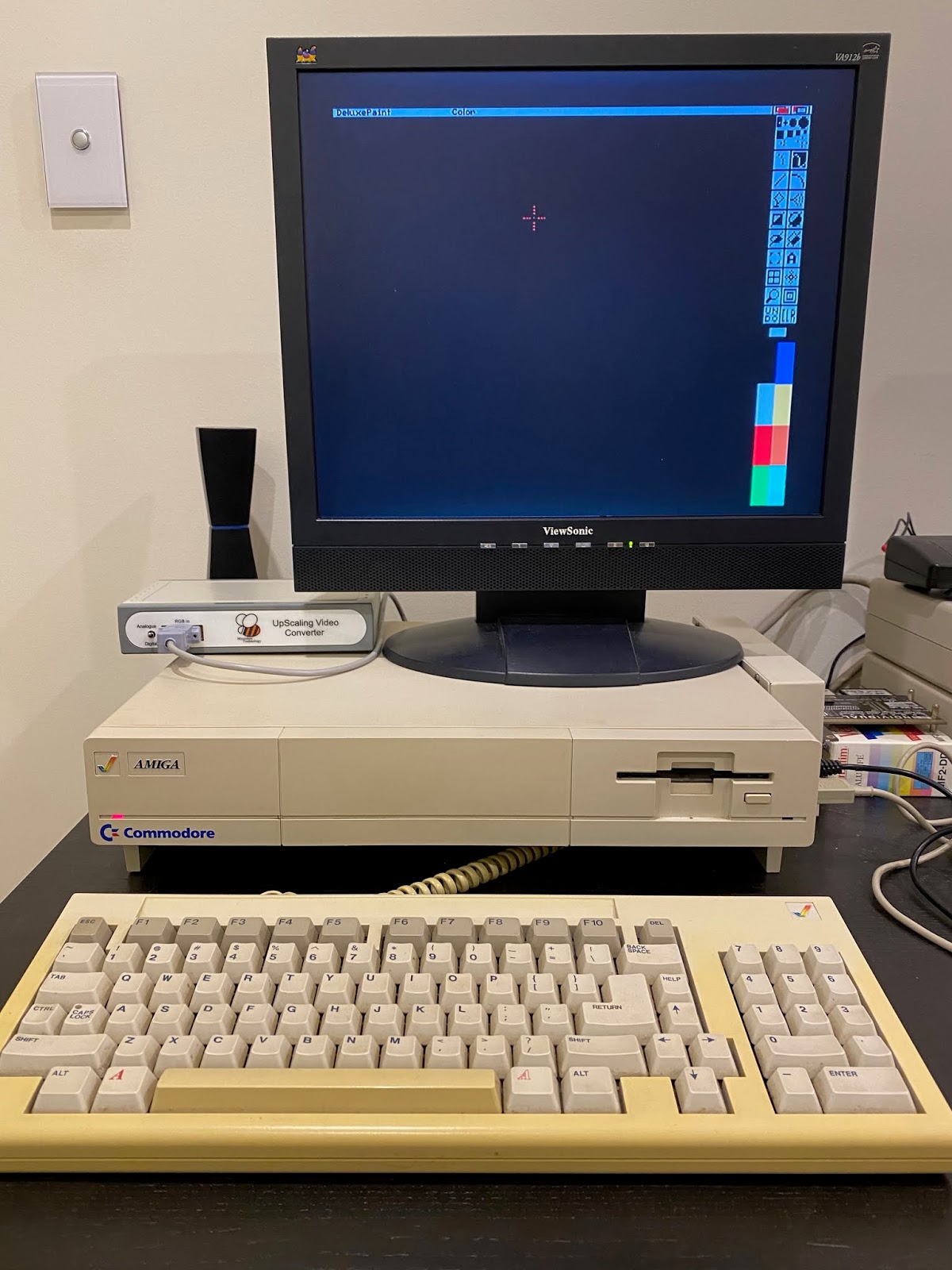
I tested interlace next and it displays very nicely with no flicker visible:
When using the normal workbench 1.3 with mouse pointer, I noticed some strange "watery artifacts around the mouse when moving. Not really annoying, but noticeable.
I am not sure if there is much you can do to optimise this (I assume the serial cable allows connection to the board inside to customise it), but it is ok for normal use and I haven't played with the board setup at all. Strictly tested as it was delivered to me.
I fired up some more demos that I know use some weird screen tricks (like Wild Copper) and it works well:
I also tested a game - APB - and with this game you can really see the artifacting up close with a purple backdrop. This is a shame as it kinda ruins things a bit:
In short, the Microbee upscaler is good, but not perfect for the Amiga 1000. When I have some more time I will try to use it on some other Amigas as well to confirm if the issues I saw are Amiga 1000 specific or not. For now I will keep using it on the A1000 as it looks nicer than using a 16:9 screen and interlace works well.
Showing posts with label a1000. Show all posts
Saturday, 11 July 2020
Monday, 10 February 2020
WHDLoad games working under Workbench 1.3
I found out this week how to get WHDLoad games working under Workbench 1.3!! I always thought it was impossible and that you needed a newer kickstart...I will share how I did it!

The reality is that WHDLoad itself DOES NOT work on Workbench 1.3, but using a separate program called JST you can run whdload slave files under Workbench 1.3.
I found out this information courtesy of Johnny Acevedo posting in the Amiga Workbench 1.3 user Facebook group recently.
JST is how I got this working on my Amiga 1000.
My Amiga 1000 uses a 2MB memory expansion, plus a ACA500 attached to the expansion slot, as below:
This allows me to boot Workbench 1.3 from CF card with a v1.3 kickstart - no need for kickstart or hd boot floppies! It was unstable when I first tried this a while back but after flashing the ACA500 firmware to the latest version it works very well and reliable now.
I am using a 2GB CF card for the Amiga boot drive. I set this CF card originally for the Amiga 3000, so the partition names are labelled WB_1.3 and WB_2.x to support the Superkickstart. But I am not using that here.
I copied my Amiga 2000 Workbench 1.3 Hard disk setup I did back in 1991 to the WB_1.3 partition, which features Simgen backdrop, tbar window frames and a changed font, upgraded shell, amongst many other customisations I did back then!
I took the CF card and put it in my A4000 (via USB) so I can copy across the files needed for JST to work on the A1000.
From the A4000 I downloaded the latest JST archive from the author's website here. I then extracted the jst binary file from the zip and copied it to c: on the CF card.
I created a drawer called Kickstarts under the Devs drawer on the CF card, and I then copied the kick34005.A500 files to that drawer. This is needed by JST:
At the same time I was busy copying my favourite Amiga WHDLoad games from my A4000 hard disk to the Work partition on the CF card so I could try them out...
With that done, I put the CF Card back into my ACA500 on the Amiga 1000 and booted into the Workbench 1.3 environment.
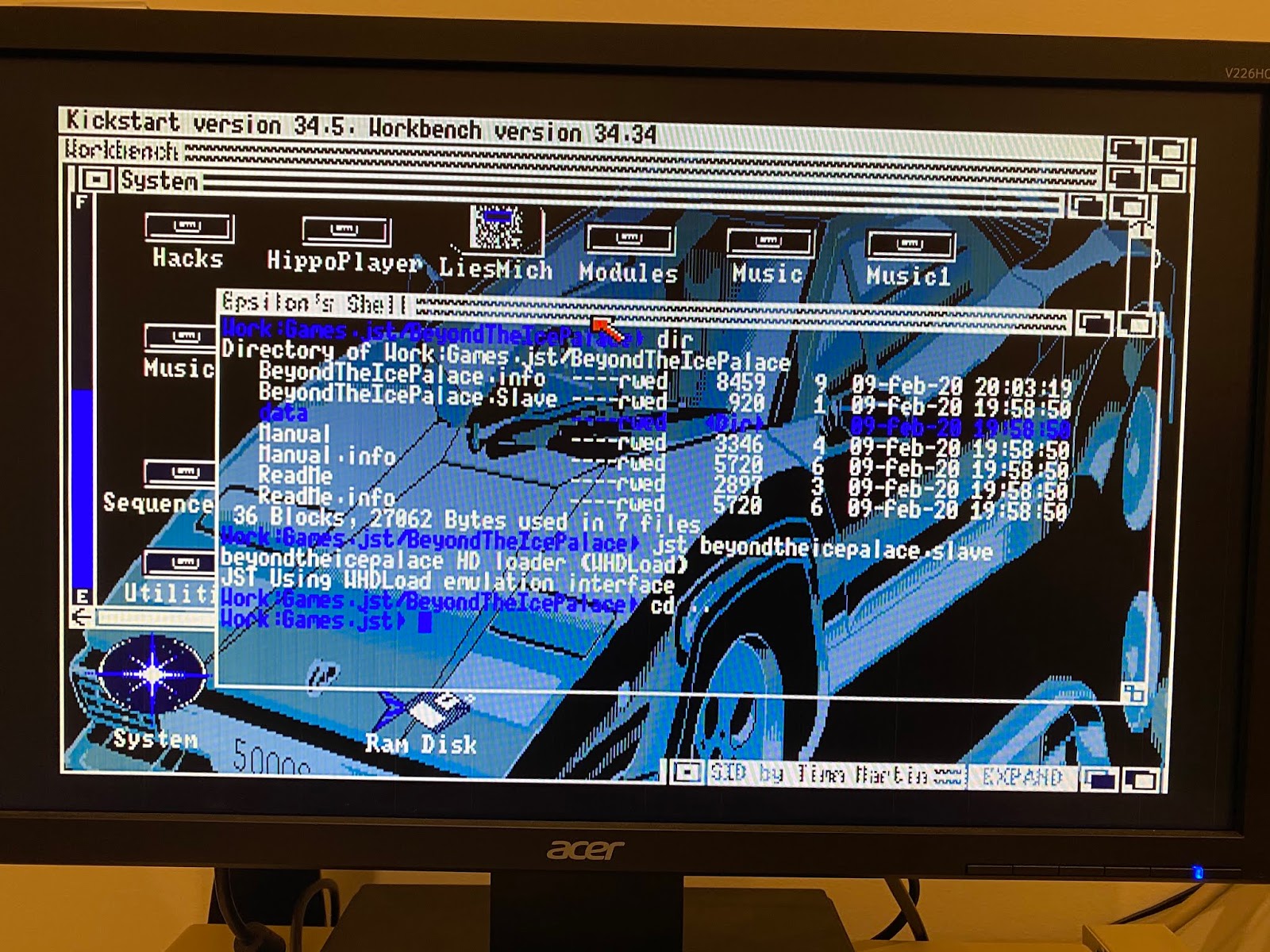
To launch the whdload games using JST, you need to called each game slave file from JST in the Shell, as below:
jst <name of game>.slave
The readme in the archive includes other parameters you can specify, but note that on a 68000 Amiga 1000 (like mine) most of these are not available to use.
The first game I tried was Gods - a bad choice as it turned out. Seems my A1000 doesn't have enough chip memory to run it:
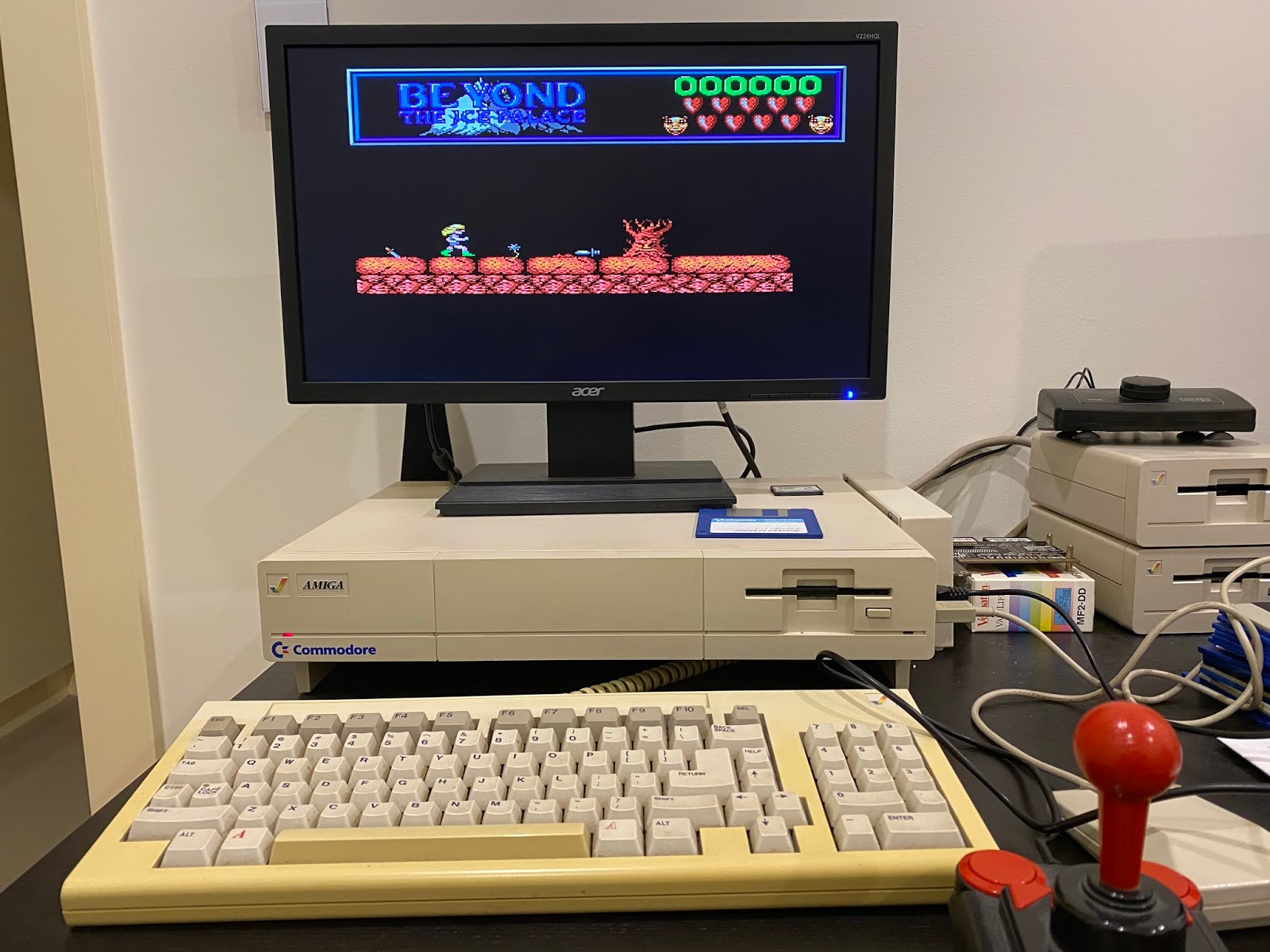
So I picked an older game to start with, Beyond the Ice Palace, which I know works on the A1000 from floppy disk normally.
Voila! It works! I can play a non-dos game on my Amiga 1000 hard disk using JST with no floppies - how awesome!
I can even quit the game with F10 and return to the Workbench cleanly, as long as the key mapped for it on the game is on the keyboard...I found a few games use the '*' key on the numeric keypad, a key I just noticed that the A1000 keyboard doesn't have!
I tried the Nitro slave file next, and Nitro also worked perfectly also using JST!
Last, but not least I tried out Lotus 2 on Workbench 1.3, which again worked perfectly using JST. Look mum, no floppies!
I didn't have a lot of time to play with this during the weekend, but I was so excited by being able to play WHDLoad games under Workbench 1.3 I had to try it out quickly late last night, and share how I got it working in case anyone else wants to try it.
Next step is trying to get it to work from the game launch icons and working out how to remap the quit key without whdload being present. I think fixing the game launch icons is not as simple as copying jst to whdload in c: but stranger things have happened. I'll try it soon.

The reality is that WHDLoad itself DOES NOT work on Workbench 1.3, but using a separate program called JST you can run whdload slave files under Workbench 1.3.
I found out this information courtesy of Johnny Acevedo posting in the Amiga Workbench 1.3 user Facebook group recently.
JST is how I got this working on my Amiga 1000.
My Amiga 1000 uses a 2MB memory expansion, plus a ACA500 attached to the expansion slot, as below:
This allows me to boot Workbench 1.3 from CF card with a v1.3 kickstart - no need for kickstart or hd boot floppies! It was unstable when I first tried this a while back but after flashing the ACA500 firmware to the latest version it works very well and reliable now.
I am using a 2GB CF card for the Amiga boot drive. I set this CF card originally for the Amiga 3000, so the partition names are labelled WB_1.3 and WB_2.x to support the Superkickstart. But I am not using that here.
I copied my Amiga 2000 Workbench 1.3 Hard disk setup I did back in 1991 to the WB_1.3 partition, which features Simgen backdrop, tbar window frames and a changed font, upgraded shell, amongst many other customisations I did back then!
I took the CF card and put it in my A4000 (via USB) so I can copy across the files needed for JST to work on the A1000.
From the A4000 I downloaded the latest JST archive from the author's website here. I then extracted the jst binary file from the zip and copied it to c: on the CF card.
I created a drawer called Kickstarts under the Devs drawer on the CF card, and I then copied the kick34005.A500 files to that drawer. This is needed by JST:
At the same time I was busy copying my favourite Amiga WHDLoad games from my A4000 hard disk to the Work partition on the CF card so I could try them out...
With that done, I put the CF Card back into my ACA500 on the Amiga 1000 and booted into the Workbench 1.3 environment.
To launch the whdload games using JST, you need to called each game slave file from JST in the Shell, as below:
jst <name of game>.slave
The readme in the archive includes other parameters you can specify, but note that on a 68000 Amiga 1000 (like mine) most of these are not available to use.
The first game I tried was Gods - a bad choice as it turned out. Seems my A1000 doesn't have enough chip memory to run it:
So I picked an older game to start with, Beyond the Ice Palace, which I know works on the A1000 from floppy disk normally.
Voila! It works! I can play a non-dos game on my Amiga 1000 hard disk using JST with no floppies - how awesome!
I can even quit the game with F10 and return to the Workbench cleanly, as long as the key mapped for it on the game is on the keyboard...I found a few games use the '*' key on the numeric keypad, a key I just noticed that the A1000 keyboard doesn't have!
I tried the Nitro slave file next, and Nitro also worked perfectly also using JST!
Last, but not least I tried out Lotus 2 on Workbench 1.3, which again worked perfectly using JST. Look mum, no floppies!
I didn't have a lot of time to play with this during the weekend, but I was so excited by being able to play WHDLoad games under Workbench 1.3 I had to try it out quickly late last night, and share how I got it working in case anyone else wants to try it.
Next step is trying to get it to work from the game launch icons and working out how to remap the quit key without whdload being present. I think fixing the game launch icons is not as simple as copying jst to whdload in c: but stranger things have happened. I'll try it soon.
Sunday, 10 December 2017
Acer LCD screen that supports Amiga native 15khz modes
Today I wanted to show an interesting LCD screen from Acer that is a current model, available brand new in 2017.
What is so special about it you ask?
Well, it supports Amiga video modes that run at 15khz! So with a RGB to VGA converter you can get native Amiga display on a modern LCD screen, without the need for a scan doubler! Exciting right?
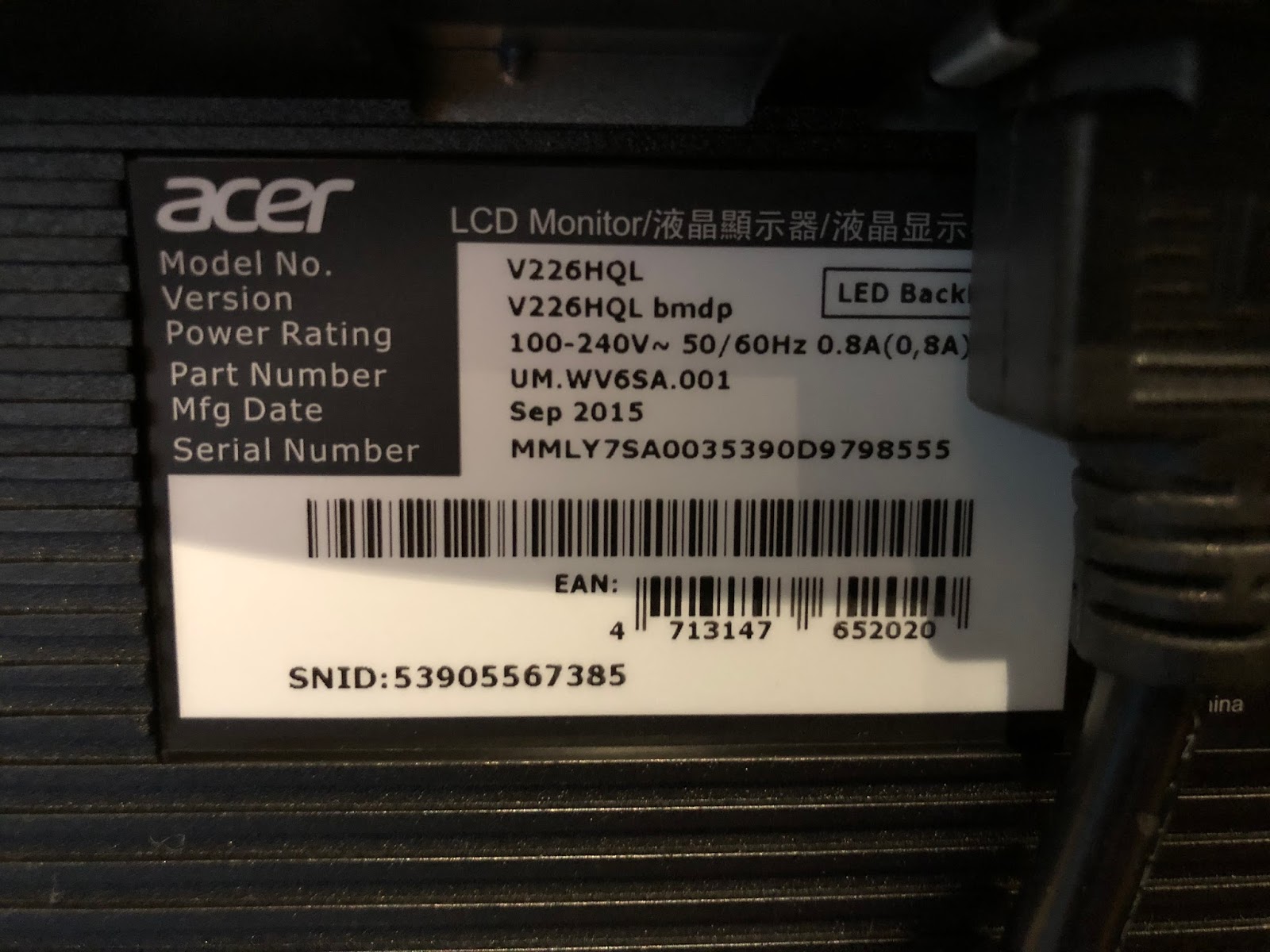
The model I got is a V226HQL model, with the exact information taken from the screen for your reference if you want to get one yourself. Even though I bought this new in it's original box, it is a few years old. I have seen others on Facebook using ones made in early 2017 that work also:
Of course, the Amiga uses a non-standard 23 pin RGB connector, intended for connection to Commodore CRT 1084(S) / 1940 or 1960 monitors. These take up a lot of room and the non-flat displays are very small in this day and age.
To connect the Acer screen to the Amiga, I needed a RGB to VGA converter. This is not a scandoubler - it just converts the existing 15khz signal from RGB to VGA.
These are easy enough to come by on Ebay, but check carefully to get ones that have a REAL 23pin connector, rather than a DIY hacked 25 pin connector on them. Generally sellers try to hide the fact they hack the connectors to make them fit a standard Amiga RGB connection since 23pin connectors are not exactly easy to come by these days. Check the photos carefully and read the seller feedback.
I found a seller on Ebay who makes these converters (from Canada actually), using the right 23 pin RGB connector. I ordered 3 of them!
Here is the converter I received last week:
As you can see it looks well made and the connectors are perfect - here is the RGB connector side:
And here is the VGA connector side:
Since I happened to have the Amiga 1200 out at the time, I decided to try it on that system first. Technically I don't need it since I have an Indivision AGA installed in it already, but hey, why not check it anyway! Here it is connected to the A1200:
On power on I held down both mouse buttons to get the early boot screen, which appeared on the Acer screen straight away! I then brought up the screen mode info screen to confirm it is indeed running at 15khz!!
The screen does promote the screen to this slightly odd 1440x288 screen mode, but it looks fine and the aspect seems ok too. I tried modifying the usual fill screen/aspect control to adjust it to 4:3, but it doesn't change the screen. So the resolution is what it is, but as I said, it displays fine from what I could see.
I moved the screen to a better place since it seemed to be working fine:
I then decided to try a different Amiga. I hooked up the Amiga 600 next. As with the A1200, I already have a Indivision ECS installed in the A600, so technically it doesn't need this screen either.
You can see it installed here, with the MAS player hardware (for MP3 playback) also installed in the back of the A600:
As you can see, the output from the RGB port at 15khz to the Acer screen works fine on the A600 also:
Something to remember though is that because it is native 15khz output that is not scan doubled or flicker fixed, any interlace modes will flicker the screen, the same as all Amigas do on the 1084S monitor or tv output.
Running Bomb's E255 demo on the A600 looked great on the Acer screen:
Next up I hooked up the Amiga 1000, one of the systems I wanted to get this screen for. Unlike the other Amigas I don't have a Indivision ECS installed or a scandoubler connected to it. It needs this screen, and so I was very excited to try it out. As you can see the Kickstart screen came up fine on the Acer:
I did hit some trouble here with the Amiga 1000 though. For some reason when I booted any kickstart disk, the system wouldn't display the Insert Workbench disk screen and instead hung on a black screen. The screen was displaying something, but the system wasn't responsive.
As a test I removed the converter from the RGB port so there was no display. I then booted from the kickstart disk and the machine was clicking the drives so I knew it was at the Workbench boot screen. I connected the RGB to VGA converter at this point and the display appeared and worked perfectly!
Strange behaviour though. It only seems to happen on the Amiga 1000. I tried 1.0, 1.1, 1.2 and 1.3 kickstarts and also all three converters I bought and they all do the same thing. Having plugged in the RGB to VGA converter after the Insert Workbench disk screen appeared, it did work perfectly on the A1000 though - here is Digital Innovation demo running nicely through the Acer on the A1000 at 16khz? Strange huh?
I guess the 16khz is what causes the problems but really don't understand that one. If anyone knows what is happening here please let me know.
Maybe it is just my Amiga 1000 - dunno.
Last, but not least, I connected my CDTV to the Acer screen. It also doesn't have a Indivision ECS scandoubler installed, and until now I use the AV out to connect it to a TV, or my HDMI upscaler to convert the signal to display on my HDMI LCD screens. Now though, I can connect the CDTV directly from the RGB port to this new Acer screen since it can accept the 15khz output. As expected, once powered on it worked great:
I fired up the rather excellent Rink A Pink demo, booting via floppy and it worked great on the Acer too:
Close up photo shows the output is 15khz:
Since I can use it great on the CDTV, I decided to leave it setup for now and played some tunes from the Immortal 4 CD while preparing this blog post.
There is a useful wiki that lists all the 15khz compatible models that people have tried out, which includes the one I covered here today. You can read it here.
It is great that we have options in 2017 to output our ~30 year old Amiga systems to modern screens, still supporting the 15khz output required! If I had more room I would buy more screens now that I know they work, but things are tight in here these days space wise. I might get one more though as a backup...
What is so special about it you ask?
Well, it supports Amiga video modes that run at 15khz! So with a RGB to VGA converter you can get native Amiga display on a modern LCD screen, without the need for a scan doubler! Exciting right?
The model I got is a V226HQL model, with the exact information taken from the screen for your reference if you want to get one yourself. Even though I bought this new in it's original box, it is a few years old. I have seen others on Facebook using ones made in early 2017 that work also:
Of course, the Amiga uses a non-standard 23 pin RGB connector, intended for connection to Commodore CRT 1084(S) / 1940 or 1960 monitors. These take up a lot of room and the non-flat displays are very small in this day and age.
To connect the Acer screen to the Amiga, I needed a RGB to VGA converter. This is not a scandoubler - it just converts the existing 15khz signal from RGB to VGA.
These are easy enough to come by on Ebay, but check carefully to get ones that have a REAL 23pin connector, rather than a DIY hacked 25 pin connector on them. Generally sellers try to hide the fact they hack the connectors to make them fit a standard Amiga RGB connection since 23pin connectors are not exactly easy to come by these days. Check the photos carefully and read the seller feedback.
I found a seller on Ebay who makes these converters (from Canada actually), using the right 23 pin RGB connector. I ordered 3 of them!
Here is the converter I received last week:
As you can see it looks well made and the connectors are perfect - here is the RGB connector side:
And here is the VGA connector side:
Since I happened to have the Amiga 1200 out at the time, I decided to try it on that system first. Technically I don't need it since I have an Indivision AGA installed in it already, but hey, why not check it anyway! Here it is connected to the A1200:
On power on I held down both mouse buttons to get the early boot screen, which appeared on the Acer screen straight away! I then brought up the screen mode info screen to confirm it is indeed running at 15khz!!
The screen does promote the screen to this slightly odd 1440x288 screen mode, but it looks fine and the aspect seems ok too. I tried modifying the usual fill screen/aspect control to adjust it to 4:3, but it doesn't change the screen. So the resolution is what it is, but as I said, it displays fine from what I could see.
I moved the screen to a better place since it seemed to be working fine:
I then decided to try a different Amiga. I hooked up the Amiga 600 next. As with the A1200, I already have a Indivision ECS installed in the A600, so technically it doesn't need this screen either.
You can see it installed here, with the MAS player hardware (for MP3 playback) also installed in the back of the A600:
As you can see, the output from the RGB port at 15khz to the Acer screen works fine on the A600 also:
Something to remember though is that because it is native 15khz output that is not scan doubled or flicker fixed, any interlace modes will flicker the screen, the same as all Amigas do on the 1084S monitor or tv output.
Running Bomb's E255 demo on the A600 looked great on the Acer screen:
Next up I hooked up the Amiga 1000, one of the systems I wanted to get this screen for. Unlike the other Amigas I don't have a Indivision ECS installed or a scandoubler connected to it. It needs this screen, and so I was very excited to try it out. As you can see the Kickstart screen came up fine on the Acer:
I did hit some trouble here with the Amiga 1000 though. For some reason when I booted any kickstart disk, the system wouldn't display the Insert Workbench disk screen and instead hung on a black screen. The screen was displaying something, but the system wasn't responsive.
As a test I removed the converter from the RGB port so there was no display. I then booted from the kickstart disk and the machine was clicking the drives so I knew it was at the Workbench boot screen. I connected the RGB to VGA converter at this point and the display appeared and worked perfectly!
Strange behaviour though. It only seems to happen on the Amiga 1000. I tried 1.0, 1.1, 1.2 and 1.3 kickstarts and also all three converters I bought and they all do the same thing. Having plugged in the RGB to VGA converter after the Insert Workbench disk screen appeared, it did work perfectly on the A1000 though - here is Digital Innovation demo running nicely through the Acer on the A1000 at 16khz? Strange huh?
I guess the 16khz is what causes the problems but really don't understand that one. If anyone knows what is happening here please let me know.
Maybe it is just my Amiga 1000 - dunno.
Last, but not least, I connected my CDTV to the Acer screen. It also doesn't have a Indivision ECS scandoubler installed, and until now I use the AV out to connect it to a TV, or my HDMI upscaler to convert the signal to display on my HDMI LCD screens. Now though, I can connect the CDTV directly from the RGB port to this new Acer screen since it can accept the 15khz output. As expected, once powered on it worked great:
I fired up the rather excellent Rink A Pink demo, booting via floppy and it worked great on the Acer too:
Close up photo shows the output is 15khz:
Since I can use it great on the CDTV, I decided to leave it setup for now and played some tunes from the Immortal 4 CD while preparing this blog post.
There is a useful wiki that lists all the 15khz compatible models that people have tried out, which includes the one I covered here today. You can read it here.
It is great that we have options in 2017 to output our ~30 year old Amiga systems to modern screens, still supporting the 15khz output required! If I had more room I would buy more screens now that I know they work, but things are tight in here these days space wise. I might get one more though as a backup...
Subscribe to:
Posts (Atom)