Showing posts with label 2017. Show all posts

Sunday, 3 December 2017

My Amiga Blog is back in business!

Hi All,

I am pleased to say that my study is finished for the year and exams done too as of today! This of course means that I can now return to my blog again!


It's good to be back.

It has not been an easy time for me since I stopped the blogs back in July. My father in law passed away suddenly in Japan in mid August which meant stopping everything to go to Japan to arrange and attend the funeral. It has been tough for my wife to deal with, being so far away from Japan and not being able to say goodbye.

In addition I have been quite unwell over the past few months, culminating in an emergency ambulance to hospital last month and a not so fun visit to the emergency room and lots of tests and pain pills. Fortunately things are on the improve and I feel considerably better now.

I have been studying when I have not been working, juggling that with my Adelaide Retro Computing Group responsibilities, continuing to help organise and run the monthly meetings.

Unfortunately it seems that the December 2017 Adelaide Retro Computing Group meeting may well be the last one. :-(

The other two organisers have decided to stop being involved from the end of this year, which leaves just me to carry on the groups activities. Given my health issues and lack of free time to take on running it by myself, I was left with no choice but to close the group down with the last meeting coming up this Friday December 8th. Hopefully we can see some of you there! I never say never of  course, and if someone is able to commit to help running the events for at least 12 months then maybe we can find a way to continue in 2018. We'll see how that pans out.

Just because I have been busy (and off air) does not mean I have been idle on all things Amiga. Far from it.

Those who follow my Facebook, Twitter and Instagram accounts will know I have continued to muck around with my Amigas still during this period when time allowed. I also mucked around a bit with my new FM Towns system too, but that is not really relevant to this blog so...

There have been some great Amiga demos released this past few months on the Classic Amiga, both AGA and OCS/ECS demos!

I have also continued my AmigaOS 4.1 Final Edition beta testing duties on the new AmigaOne A1222, but unfortunately can't discuss that since that work is covered under NDA.

I recently wanted to get the Vampire 500 V2 into my Amiga 500, but that meant fixing the Amiga 500, which has not worked since the last time I tried to use the Vampire in it...heh.
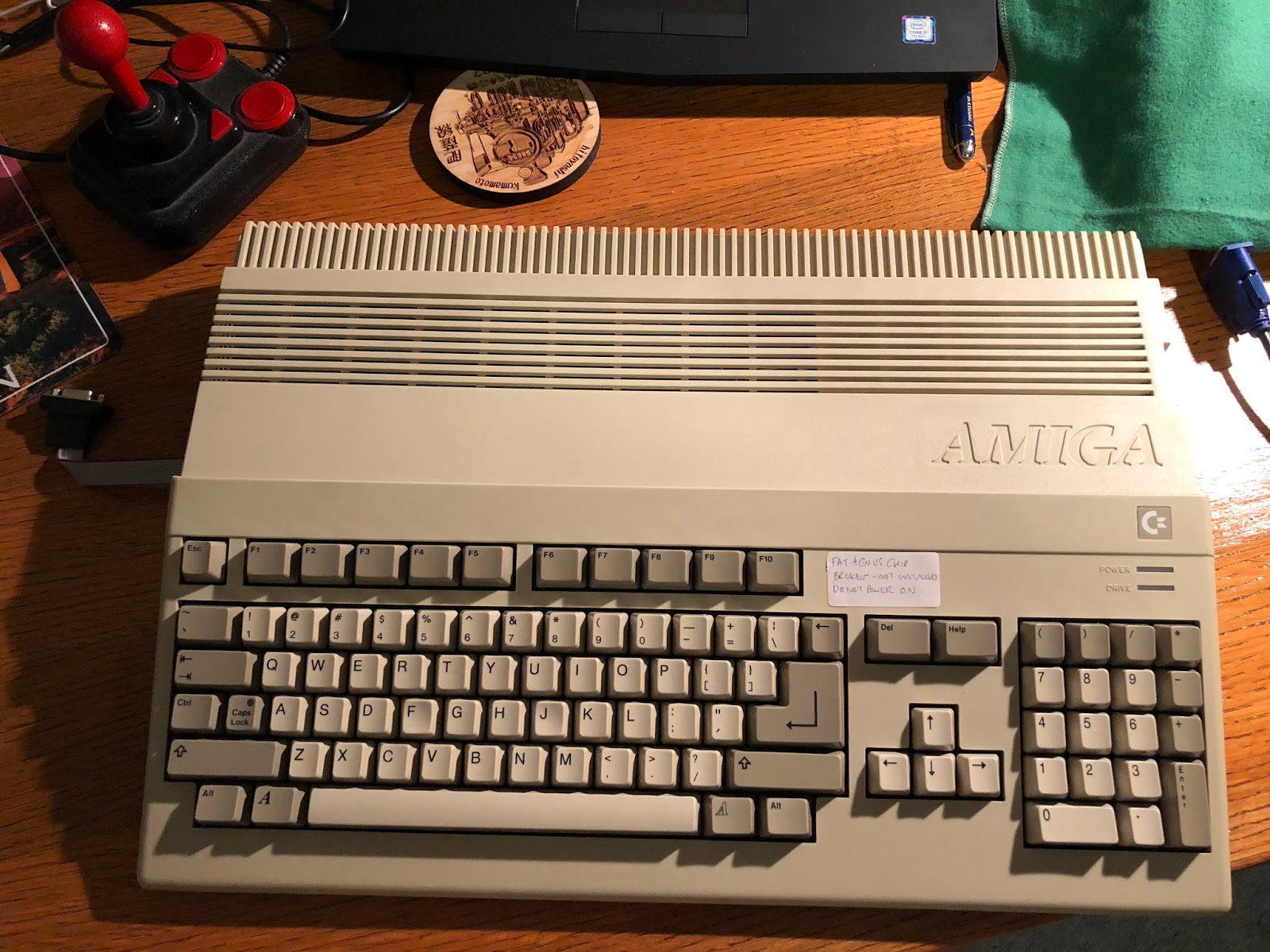

While mucking around with troubleshooting that, I reseated all the chips, and unfortunately managed to break some of the pins on the fat agnus chip when removing it! Argh! So the A500 went into storage until I could source another one.


Finally though I managed to get another one from Germany recently, so I pulled apart the A500 again to hopefully get it working:


My Amiga 500 has an Indivision ECS installed, as well as a gotek mounted on a 3D printed floppy chassis that is designed to fit the A500 case without any modifications:


Here is the missing Fat Agnus chip location:


Here it is with the new Fat Agnus chip installed:


Unfortunately though, the system still doesn't boot and work as expected. Green screens, red screens and black screens, with no idea what the issue is yet... I tried changing the CPU, the kickstart roms and even installed the Vampire 500 V2 again minus the cpu and kickstart roms but no joy as yet. Sigh, back into storage for now until I can come up with another way to fix it or replace the motherboard. Looking like that path is more likely...

So I hooked up the Amiga 600 to make sure it was still working and put it all back together as a complete system again. Here it is working great:


Back in August 2017 at the Adelaide Retro Computing Group meeting, some friends and I organised a two player null modem link up between my Amiga 2000HD and a friend's Amiga 4000D. It made for a lot of fun that night, although being beaten so badly at link up two player Stunt Car Racer made me feel very embarrassed - I thought I was good at that game! At least I won at Lotus 2 and Vroom :-)
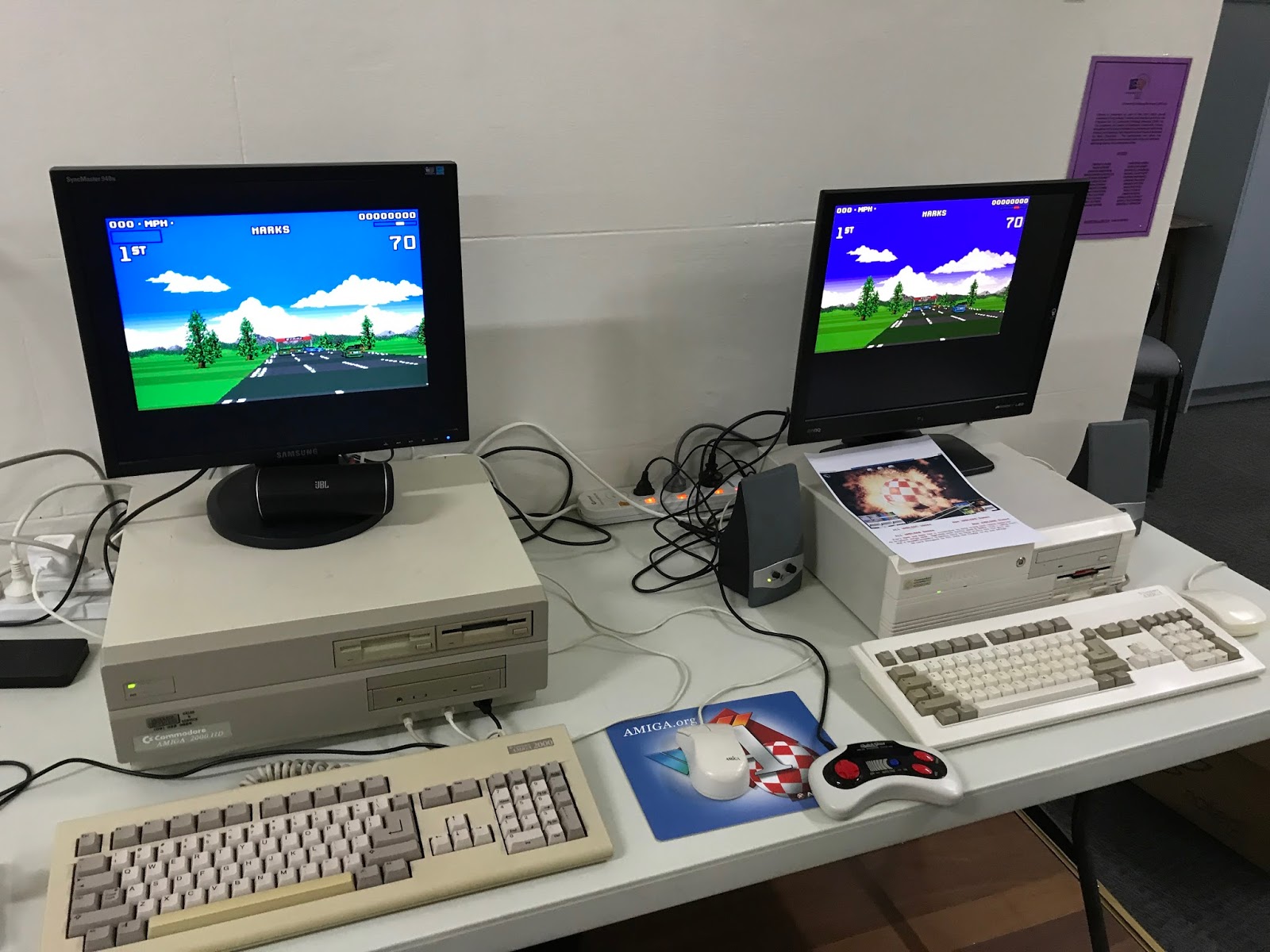


As you may recall my Amiga 2000HD was downgraded from the Vampire installation that was in it before, and now has a 68030 accelerator and 68882 FPU, 128MB fast memory, Picasso II RTG AmigaOS 3.9 BB2 Workbench, Rapid Road USB installed on X-Surf 100 network card, Prisma Megamix card, MegAChip (2MB CHIP), Oktagon SCSI card with 1GB HD (need to upgrade that still), SCSI CDROM, Indivision ECS and kickstart switcher 1.3/2.0/3.1. Whew. :-)

The Amiga 4000D here next to my A2000HD is not mine, but does have the new MNT VA2000 RTG Zorro graphics card installed, 060 and plenty of other goodies too:


Let's take a closer look at the MNT zorro RTG graphics card, with scan doubled pass through native Amiga display addon with HDMI output:


Meanwhile, reviewing on things that happened since the blog stopped, back in July 2017 I replaced the CDTV SCSI card module I bought a long time ago now (and had plenty of issues with it too) with a new one I found on Ebay. This one works a lot better and much more consistent - the old one is on the left, the new one on the right:


The new one is a lot simpler on board as you can see:


It still has the internal SCSI cable, as well as the external SCSI connector, and a SCSI card disable switch.


I hooked up my old Amiga 2000HD 52MB SCSI hard disk to it and it worked perfectly - here playing some mods using Octamed Professional v3 on the hard disk:


Of course I soon got distracted, playing Psygnosis demo CD, and some music too - the CDTV is so great for CD playback:


I also tried out my Defender of the Crown Extended Collector Edition CDTV version (not pictured).


I got into playing Xenon 2 Megablast, the CDTV version. The audio is fantastic on this compared to the original Amiga version. As a big fan of Bomb the Bass, I was glad to finally here the remixed versions of their Megablast (Hip Hop On Precinct 13) included on the CDTV version:


I received a spare Amiga 4000D from a friend in Sydney that has been tower converted (not working) with a number of interesting expansions, including the rare Picasso IV Paloma add on! :-)


This A4000D has been towerised in a Dell Inspiron desktop case from the late 1990's with plenty of modifications.


Cyberstorm 060 accelerator with 128MB memory and the optional SCSI addon installed, connected to the SCSI Hard disk and SCSI CDROM:


Also installed is a USB v1 zorro card I haven't seen before, with the Picasso IV Paloma and PVE 2.0 expansion installed:


Once the daughterboard and cards are removed (difficult job given they were mounted into a customised cage, you can see the Amiga 4000D motherboard, 16MB memory, along with a Varta battery installed. Argh! Get that off quick! (Yes, I did...)
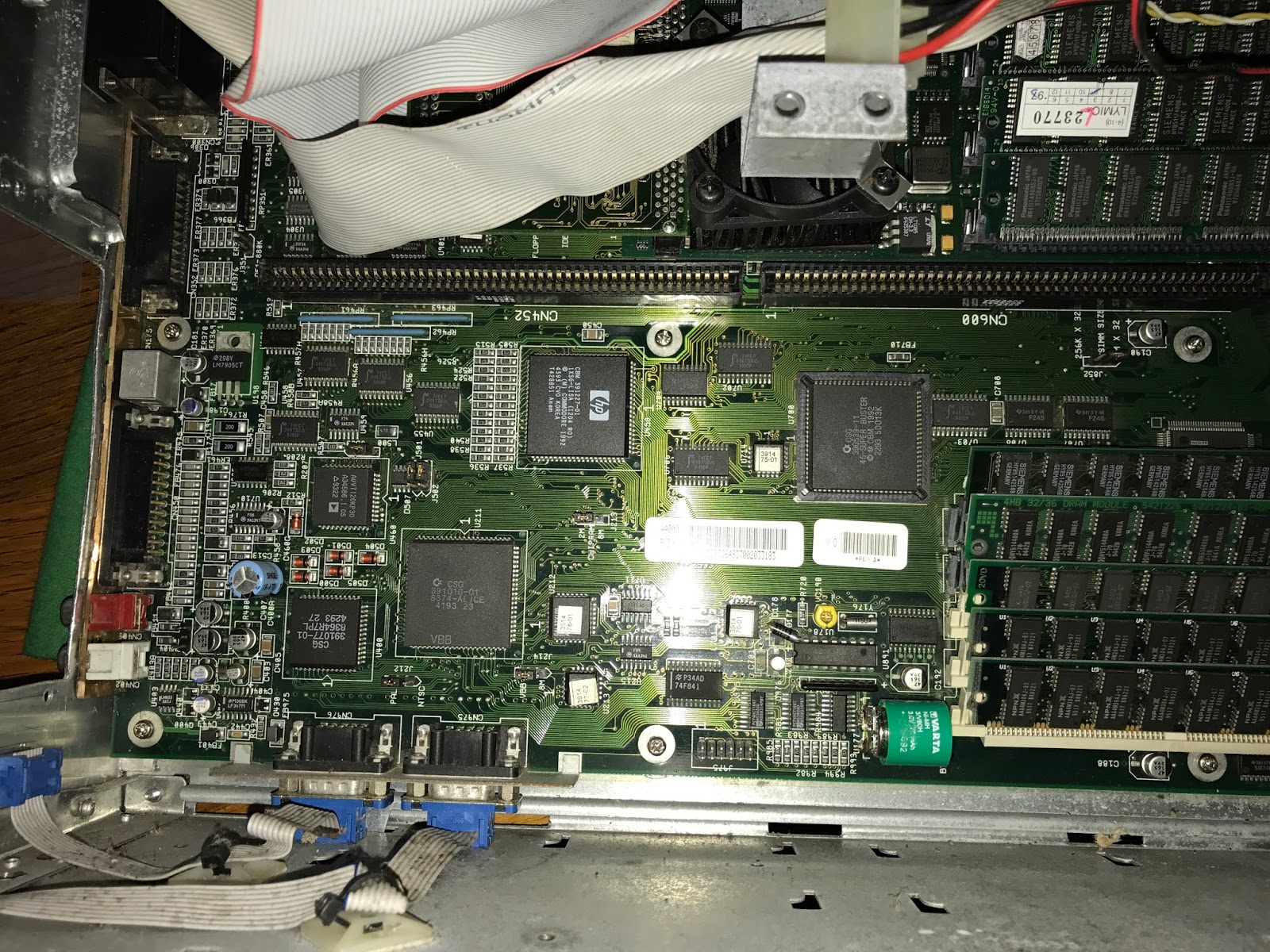

You can see the mouse/joystick extension cables to route the A4000D ports on the motherboard to new locations on the rear of the case, since they would otherwise be completely inaccessible.


Unfortunately although this system looks impressive and powers on, there is nothing appearing on the screen and does not boot. I have stripped it of all non-essential boards and still nothing. I have tried a known working cyberstorm 060 and even the original Commodore 040 accelerator board from my own A4000D but no go...guess this one also goes into the too hard basket for now.

Just to prove that not everything Amiga related is Classic Amigas, I also installed the updated Enhancer v1.3 software package from A-EON Technology on my AmigaOne X1000.


I enjoyed greatly the updated PTP functionality in Enhancer on AmigaOS 4.1 Final Edition Update 1, which allows me to transfer my photos and videos from my iPhone 7 to my X1000!


I have to say this is a really big step forward on AmigaOS 4.1 final Edition Update 1, thanks to Enhancer - it works great:


Here it is showing previews of the photos on my iPhone, allowing me to select the photos for transferring to my X1000:


Here is the transfer underway. And yes, I do have a lot of photos on my iPhone!


 I also played around with the new updated Radeon HD and Warp3D Nova drivers, enjoying the live workbench cube demonstration, which has a rotating cube with each face containing a live view of my Workbench screen. As I move the mouse and windows around, it updates on the cube in real time. Very cool:


Last but not least, I also played around with the updated E-UAE with SDL RTG support, which allows me to get full screen 1920x1080 emulated Workbench OS3.9 on my X1000:

Here is the lines highlighted in the E-UAE configuration file .uaerc I had to modify to get the RTG card support, which I could then setup through Picasso 96 under the emulated OS3.9 installation on the X1000:


Here is the resulting 1080p AmigaOS3.9 emulated Workbench screen on my X1000. I could switch easily between it and the normal AmigaOS 4.1 Final Edition Update 1 screen with the Amiga-M/N keyboard combination.


Well that should bring up mostly up to speed with what I have been up to during my time away. I did installed a replacement RapidRoad USB into the X-Surf 100 on my Amiga4000D system too, and finished the reinstall of the Amiga 1200 system hard disk, which I have been enjoying many 030 AGA demos as I have been typing this entry tonight!

Oh, and I recently tweaked the appearance of this Amiga blog, using a new theme Blogger has available now that looks much more modern. Still finding my way around it (having some trouble with the image on the left which doesn't auto size right for some reason) and expect to tweak it some more still. Happy to receive feedback on what works well and what doesn't.

I will hopefully do a few more blog entries before the Xmas break. Stay tuned!


Saturday, 20 May 2017

AmiKit X

This week saw the release of the latest AmiKit X, a very fancy Classic Amiga prebuilt setup using WinUAE to create a ready to run rather awesome looking Amiga  experience on your modern PC or Mac system.


Unlike previous versions of Amikit which were very inexpensive to purchase on release, this latest one is significantly more expensive to buy at EUR29.95 which suggests a lot of work has gone into this release.

You can still download the older v8.5 AmiKit for free though, if you want to get a feel for what AmiKit has to offer first.

There are bundle offers on their website to get both the Mac and Windows versions, and a Super Combo to purchase AmiKit and Flower Pot (AmigaOS 4.1 installation assistant):

Note that you still require the kickstart roms, which are available from Cloanto via the Amiga Forever 2016 package, which I have previously purchased and installed on my PC.

This of course brings me nicely onto my new laptop PC, recently purchased to replace my 6 year old Core i7 3.2Ghz Tower PC. This latest one is an Alienware 15R3 laptop, with Core i7 4.4Ghz CPU, 32GB memory, 3x1TB internal SSD, Geforce 1070GTX and external graphics amplifier for installing even higher end gfx cards in the future as needed... :-)


This machine is intended to replace both my PC, and my MacBook Pro. I wrote a rant on my Facebook page recently about my reasons for that - I won't bore you again with it here!


Demos runs very nicely on this new system!


In any case, it seems the perfect machine to try this new AmiKit X on!

This latest AmiKit X version includes (amongst many other enhancements) the Rabbit Hole functionality to allow windows applications (and Mac applications under MacOS) to appear to run within the AmiKit Classic Amiga environment.

The setup program is simple enough to follow:


Tell it where you want it installed and off it goes:


When done it gives the option to locate suitable kickstart ROM on the computer, which I ticked before clicking on Finish.


This then runs the AmiKit ROMFind utility, which then searches your computer to locate valid Amiga Kickstart roms to use with AmiKit:


Because I already had Amiga Forever 2016 installed, it was found in the default location above:


With that done, it is time to launch AmiKit X, which gives the options to Launch, Configure (WinUAE), Get OS (link if you don't already have Amiga Forever, AmigaOS3.9 or AmigaOS 4.1 Final Edition to proceed with the AmiKit X installation in WinUAE):


A Quick start guide for AmiKit X is included here.

In the configure option on the launcher above, you can configure the AmiKit X configurations created as part of the installation. We will fiddle with this later:


I closed this and went back to the Launch option in AmiKit X to start things off, using the default configuration already set in WinUAE - as normal with AmiKit, you need Workbench 3.1, AmigaOS3.9, OS4.1 Final Edition or Amiga Forever (CD or already installed) to proceed:


Since I already had Amiga Forever 2016 installed, I selected the AF Installed option, and it quickly went about copying the required Workbench files and setting up the AmiKit X system. It was completed very quickly:


You need to select your screenmode. Initially I used the default 720p resolution as suggested. We can change this later of course. Once done the installation is completed, and press Enter to reboot the system (within WinUAE):


On reboot we very quickly get the amazing AmiKit X Workbench screen, looking truly amazing for an out of box installation of AmigaOS!


Compared to AmiKit v8, I believe this looks much nicer, and has the Windows drives already mounted into the Workbench, ready for use.


The updated start menu and taskbar looks great and very functional, although I am a bit confused why the Amiga Shell is not included in the icons at the bottom by default - it is always the first thing I use to get to run my beloved demos!

Below you can also see the Rabbit Hole functionality included in AmiKit X, while I am browsing my Windows 10 drives and enjoying some demo mods through the registered EaglePlayer software.


Here is a closer look at the great looking icons included with AmiKit X:


Here is the prefs drawer:


You can use the Live Updater in AmiKit X to update the software from the internet as new updates are released for it. Network connectivity works out of the box too, which is great.


Via Morpheuz, you can modify a lot of features in AmiKit X, as with the previous versions of AmiKit.


In this case I wanted to change the resolution from 720p to 1080p, which is easy enough to do by clicking on Resolution above, then selecting Full HD 1080p. When done, reboot the system for the changes to take effect. It will try (and fail) to change the resolution before rebooting, but cancel that and reboot - all will be well.


Have to admit AmiKit X looks swish on my 27" Thunderbolt display at 1080p.


Looking closer you can see the Aminet link at the bottom initiates a pre-configured Aminet FTP connection to make downloading files very easy, thanks to the Dopus 5 integration built into AmiKitX.


The updated taskbar and start menu looks great:


Being able to access the AmiKit hard disk programs from the taskbar is very handy too:


Naturally of course from here it didn't take me long to try out some of the included demos on AmiKit X:


It was around this point that I hit some problems that are worth noting. The default configurations of AmiKit X are emulating a 68020 A1200 only. I assume this is because it decided itself to use the A1200 kickstart. I didn't see any option to select something else, unless I missed something obvious.

You will need to adjust the settings to use 68060 CPU in WinUAE to be able to run the newer AGA demos that need an 060 to run.

Simply press F12 to get the WinUAE config screen to make the necessary adjustments as below:


With this done, the AGA demos then worked as expected, taken from my Amiga 4000T hard disk backup kept on my Windows 10 hard drive, which is mounted under AmiKit X automatically:


AGA demo time, starting with 2017 demo from Focus Design - Hoffman makes the best mod music!


TBL's Rift (from 2014) also being run through it's paces.


Not sure why it claims 88% CPU - from where I was sitting it runs silky smooth and actually faster than a real Amiga with 68060 can run the demo...probably need to adjust that a bit.

WHDLoad games work well also, although please note that the version of WHDLoad included with AmiKit X is not the latest version - I recommend updating it to the latest version.

In my case using Amiga Forever as the source during the installation it copied all the required kickstart rom files to the right place under Devs:Kickstarts, but if you used another method (eg. Workbench 3.1) please check and make sure these files are copied there first as WHDLoad needs them to run.

Here is Agony WHDLoad running under AmiKit X:


There are plenty of included applications to try out too, like Perfect Paint:


Vice C64 emulation:


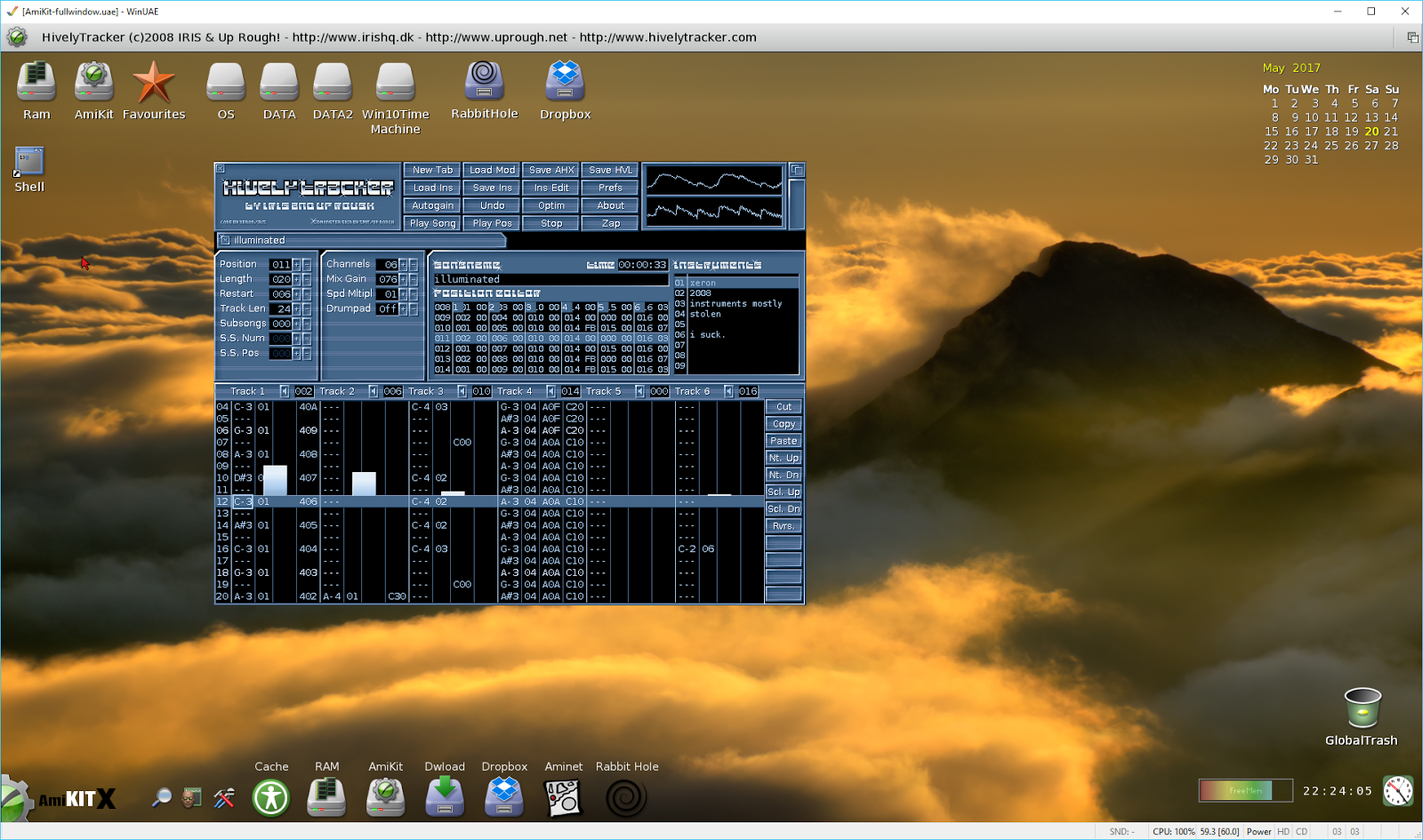
There are many applications to try out, and the audio ones (AmigaAmp, Delitracker, Eagleplayer and many more) are great too! Here is Hivelytracker, a chip tune tracker, another inclusion on AmiKit X:


Homebank accounting software is also included:


This is just a small sample of what is available, there is plenty more to try out! Netsurf, IBrowse and AWeb internet browsers are also here, straight out of the box.

A full list of the 380 programs included is here.

MicroGoldEd is also included, along with the full registered version of MUI 5.0:


I plan to add my purchased copies of Hollywood 7, Cubic IDE and many other applications to this installation in due course.

The speed of AmiKit X and boot time under this PC is fantastic. I understand considerable work went into optimising the boot speed of AmiKit for this latest version and it certainly does boot fast!

ISO mounting is also included out of the box, below I have mounted a freshly purchased and downloaded ArcaOS 5.0 ISO for installing on my PC via Virtual Box.


For those curious, ArcaOS was released this week and is the newest version of IBM OS/2 - yes it is still under active development, like AmigaOS! Who would believe it in 2017!

Dropbox functionality is also present to enable syncing of files between Windows Dropbox and under AmiKit X. Although I imagine this is useful for some people I have no use for this so I haven't tried it as yet.

I wanted to try out the Rabbit hole functionality next. In essence the idea is that when you launch a file that requires a program from the host PC to run (eg. docx, pptx need Word and PowerPoint), or click on a web link (Edge / Internet Explorer), it launches the respective program from AmiKit X.

You can also launch some programs direct from the Rabbit hole drawer with some examples already included:


In my case running "Host Prefs" launches Windows 10 Control Panel, Notepad runs Microsoft Notepad and Chrome launches the Chrome web browser. I noted that VLC, Steam and Skype didn't work, even though I have them installed on Windows 10. Not sure what is happening there.

This "integration" means you shouldn't have to switch back and forwards between the host OS (Windows 10) and the AmiKit X full screen Classic Amiga environment to run applications, and should appear "on top of" the AmiKit X workbench.

The idea being it looks like it is kind of integrated, like this example (via Windowed AmiKit X that I cropped) of Notepad.


The illusion of course would work better if you ran an AmigaOS theme on Windows 10 that makes the Windows 10 program windows look the same as the AmiKit X ones...

This trick has been done on the A.L.I.C.E laptop setups using AmiKit X also - I saw this very well at the Adelaide Retro Computing Group meeting last year when Trevor Dickinson brought his A.L.I.C.E laptop to show this with Linux programs running on top of AmiKit X:


In theory this functionality means you could run AmiKit X as your main desktop and just launch your everyday programs from it.

Sounds great...except for me it didn't work as advertised. Maybe because I run more than one screen. Actually, I run three, one 30" Dell TFT on DisplayPort, one 27" Apple thunderbolt display and the laptop 1080p display.

AmiKit X gets confused about which screen to open the application on, and as a result the application opened usually appears on a different screen than the one running the AmiKit X environment in full screen.

To compound this annoying behaviour, AmiKit X drops out of full screen mode every time an application is launched via Rabbit hole and minimises to the taskbar, meaning I have to find it again to maximise it back to full screen, destroying the illusion even if it did open on the same screen...

I tried modifying the WinUAE settings (Display and RTG board sections as below) to force it to use one specific monitor for RTG modes and normal Amiga display modes (the same monitor as the default screen Windows 10 is using as the main display), but the behaviour of RabbitHole didn't alter - it minimises the AmiKitX full screen to the taskbar everytime.


I also tried on both graphics cards (before people say I didn't try it) but it still worked the same way.


Perhaps your mileage may vary. I should test this on a single laptop display I suppose but multiple screen configurations are not uncommon in this day and age and I don't want to have to stare at the tiny laptop screen and be undocked in order to use this RabbitHole feature.

I also couldn't find any documentation on how to add other application launchers to the Rabbit Hole drawer so I couldn't try that out yet either....if someone knows how please let me know as I want to try it!

Anyway, I guess it doesn't matter that much since it is just an illusion anyway (not true integration) but I think people should be aware of the multi-screen limitations at this moment. Hopefully this will be fixed in time via an free update for customers.


In summary, AmiKit X offers a hell of a lot of features and inclusions, and the pre-built environment is wonderful and saves us all a huge amount of time. To build the very basic AmigaOS 3.1 or 3.9 environment into something even remotely close to what has been achieved here would likely take weeks of effort. Time most of us don't have anymore!

For that significant work alone, AmiKit X is worth the outlay!