Tuesday, 11 November 2014

AMIStore released and new Applications for X1000

Today AMIStore App Store was released on AmigaOS4.1 - regular blog readers will know I have already tried out a sneak preview of AMIStore, but now I can run the released version, purchase and try out some of the new applications, drivers and utilities on my X1000!


You can download AMIStore from www.amistore.net. I covered the features and installation AMIStore in my previous blog entry here so I won't repeat it again here...

This now is the release version of AMIStore for the public, running on my X1000:


 I even have a few friends now on AMIStore after meeting many Amigans at AmiWest 2014 last month! Will be adding more friends soon!


Needless to say it didn't take me long to start buying stuff on AMIStore:


 First cab off the rank was the new Radeon HD 2.4 driver for AmigaOS4.1 from A-EON:


Here is the downloaded Driver, ready for installation:


The Installation process for Radeon HD 2.4 driver is very simple, with a reboot at the end:


The updated MPlayer is not available on AmiStore yet, but even with the old version of LiveForIt's MPlayer I felt that the playback of video was improved with the new driver - fullscreen HD 720p video (Girls Generation) on the left screen, DOpus 5.9 screen on the right (click to expand):


Next I downloaded CANDI (by Entwickler-X) from AMIStore, and here is the extracted folder with a number of different Workbench animated backdrops to try out:


The DefaultLight animated backdrop looks nice (click to expand):


I really like the RedLight animated backdrop (click to expand):


I then added this to my WBStartup so it is run on boot each time:


Next I briefly tried out NemoSound (by Lyle Haze), which allows control of the onboard X1000 sound card specifically, allowing monitoring and recording of input ports as well as the master volume control to turn up/down or mute the audio from the X1000:


This is the Control UI for NemoSound:


Next I tried Andy Broad (Broadblues) upgraded Personal Paint 7.3 native AmigaOS4 PPC version from AmiStore:


The initial view is definitely Personal Paint, but now upgraded in 2014:


You can modify the Image format to make use of the large real estate on HD screens (click to expand):


I loaded an example image into Personal Paint to show it off - it supports many different graphic file formats (click to expand any photos):


The zTools Suite from zzd10h is also on AMIStore and very reasonably priced - I also grabbed this:


The suite is broken down into Dockies, Multimedia programs and Utilities. He has certainly written a lot of useful utilities over the past few years for AmigaOS4.1 and it is goods to see them in a bundle like this. The Readme shows all the utilities on offer:


I can't possibly cover all the Utilities today, but here is a small sample. Below is a screen grab of the GFX Card Docky in action, showing memory used and free, current screen resolution and model number:


Another of the zTools utilities is SysMon, which monitors your system and even can benchmark your AmigaOS4.1 system:


SysMon showing the X1000 system information, including the upgraded RadeonHD 2.4 driver:


SysMon showing running applications:


Showing the devices connected to my SATA controller on the X1000:


And finally showing the SYSMon benchmarking functionality, here running the RageMem benchmark:


I intend to explore more of these programs fully this coming weekend, so this is a brief glimpse of what to expect!

It is certainly an exciting time on AmigaOS4.1 with the launch of AMIStore, The App Store content purchase and delivery model finally arrives on AmigaOS4.1 (with AmigaOS3 to follow)! 

We now have released a number of new applications, games, drivers and utilities for AmigaOS4.1, and even some utilities like NemoSound especially for the X1000! This is just the beginning, with plenty of new content to follow no doubt in the months and years ahead.

Definitely download AMIStore if you run AmigaOS4.1! 

If you can, please start buying software on AMIStore and in so doing supporting the AmigaOS4.1 developers that create the software that keeps our Amiga systems interesting and moving forward in 2014! 

Saturday, 8 November 2014

Icaros Desktop 2.0 on Acer AspireOne ZG5 Netbook

This past week we finally see released the new Icaros Desktop 2.0 upgrade (AROS), so I was keen to try it out on my existing Icaros 1.5.4 installed netbook (I showed this at AmiWest 2014) - the Acer AspireOne ZG5.


You can download the Icaros Desktop 2.0 Live DVD from here. The Dvd includes everything you need to get a usable Icaros system on an x86 PC, including a large array of applications and utilities included! (You can click on any image to expand it for more detail)


Icaros is an alternative to AmigaOS4 and MorphOS as a Next Generation Amiga operating system - unlike the other two I mentioned it runs natively on a standard x86 PC.

You can just boot the Live DVD to try it out on your x86 PC system - you don't have to install it to hard disk until you have tested it out and are ready to do so. It is free to download and use!

The next photo shows a closer view of the Acer Netbook running the Icaros Desktop 2.0 live DVD from external dvd drive connected to the netbook via USB.


After installing Icaros Desktop 2.0 onto the hard disk using the InstallAROS icon on the desktop (which wiped the previous 1.5.4 installation - it does prompt you before it does it!), you then get a nice new Icaros Desktop using Directory Opus 5.9 Magellan as the Desktop, rather than the previously used Wanderer UI.

This is a great move in my opinion - I definitely prefer the Dopus 5.9 Magellan UI to Wanderer.

Since it is Directory Opus 5.9, I can easily change the drawer views to Icon Action (Right click, View As > Icon Action), creating the familiar DOpus interface for easy file management under Icaros:


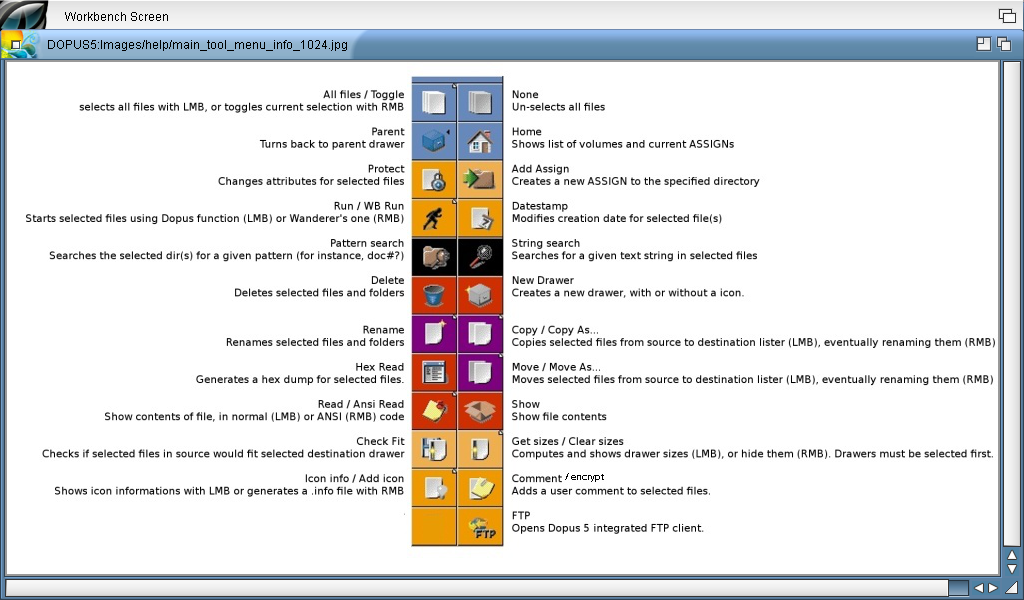
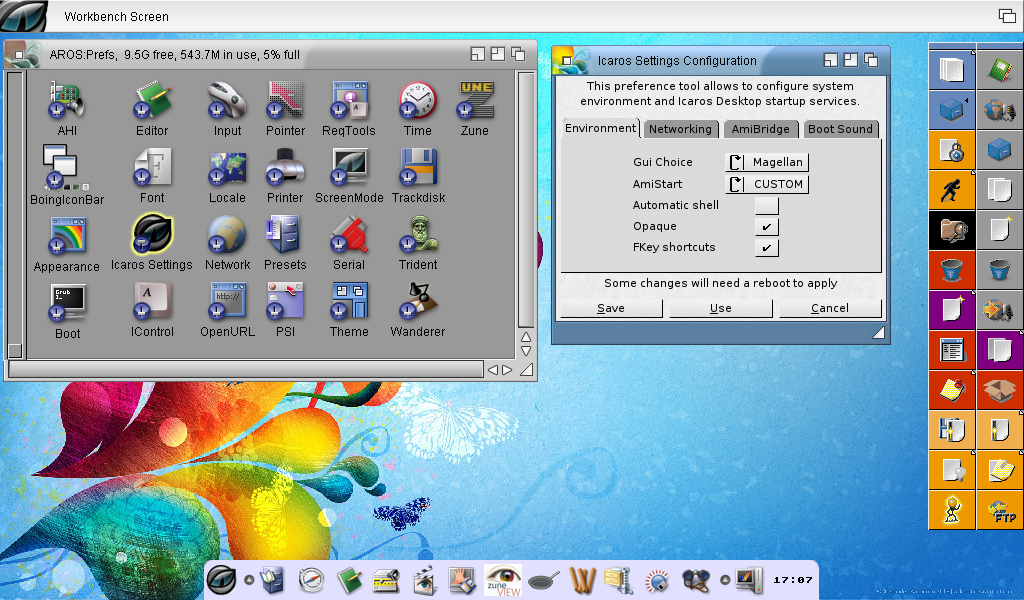
There is also a modified Directory Opus toolbar on the right hand side with common operations - the distribution thoughtfully includes a icon on the bottom left of the toolbar that explains what the icons do:


One of the new applications included in the Icaros Desktop 2.0 Live DVD is Zune View, which allows thumbnail view of images, and simple graphical operations on images such as Resize, crop, Rotate, Flip, Color correction and more:


The Dock icon bar from previous versions of Icaros is still present in it's latest incarnation, allowing easy access to all programs installed without having to navigate through the drawers via Directory Opus:


Helpfully included in the installation of Icaros Desktop 2.0 is an 82 page Manual, which I was reading while listening to the example MP3 music file included in MyWorkspace vis MPlayer.


MyWorkSpace is a bit like the Windows Library folder concept under a user's home folder, with Music, Videos, Pictures, etc, subfolders under MyWorkspace for easy access. In addition to a shortcut on the desktop, each of these subfolders also has an Assign, eg. Pictures: which allows quick access from file requestors.

Next I wanted to try out the DiskImageGUI, which I have used heavily on AmigaOS3 and AmigaOS4, but not on Icaros before. It works exactly the same and works out of the box - below I mounted a CD iso file and also an old Amiga Computing cover disk to prove it works:


You don't have to use the DiskImageGUI though to mount images - you can also right click on an ISO in the Directory Opus listers to mount as ICD0 for example - very convenient. I mounted a CU Amiga CoverCD ISO this way:


Straight away the CD icon appears, ready to open up:


Being a big fan of Amiga (and other) modules, I next fired up HarmonyPlayer on Icaros Desktop 2.0 to play some tunes:


I can't imagine why you would want to, but in the prefs under Icaros Settings there is the option to change the Desktop back to the Wanderer GUI rather than the new Directory Opus 5.9 Magellan default:


At the moment I haven't got network support working, so I can't show off the internet applications yet - once I work it out I certainly will though. Networking worked out of the box with Icaros 1.5.4 on this machine so not sure what the issue is yet. Seems some other people are having network issues too. I am keen to try out the IndieGoGo App store included with this release once resolved...

Update 14/11: I have now fixed the networking issue - I needed to use the wireless Atheros 5000 driver to get the wireless networking working - all good now.

You can download software for AROS from a number of places, such as The AROS Archives here as a starting point, the AROS community forums at AROS-Exec and some interesting game developments on AROS too via AROS Gamer.

Next up on Icaros I played Putty Squad, which is an AGA game unreleased until recently by System 3 after being shelved in completed state and not released for 20 years! There is a link to it included in the Icaros Desktop 2.0 Dock icon:


This game is launched using the Janus-UAE 1.4 environment in Icaros, which presents the configuration GUI prior to starting the program - it is setup as a standard Amiga 1200 AGA computer emulation in this example - you can modify the configuration in the tabs as needed to fine tune:


When I click Start, Putty Squad loads up and runs:


On the emulation front, plenty of system emulators are included in the Icaros Desktop 2.0 Live DVD, including VICE, the Commodore 64 emulation. I had to try this out:


I ran the included D64 included with the distribution, which works - the emulation runs at or near 100% while running:


There is a lot of technical changes under the covers (like ABI0 to ABI1), but this doesn't mean much at all to me as an end user - although I am sure it is probably a good thing! I am glad they are improving Icaros, and it is great to see a new release in 2014.


There is still plenty more to explore and setup yet as I just got started with it (especially I need to play more with Amibridge and the Co-existence functionality as I haven't set it up properly yet). But hopefully this gives you a small taste of Icaros Desktop 2.0.

Tuesday, 4 November 2014

Me And My Shadow on X1000

After watching Tekmage's games presentation at AmiWest 2014, I found one game that I hadn't tried out yet on my X1000! The game is called Me and My Shadow.


The game was ported to AmigaOS4 by HunoPPC, who had helped port so many games to AmigaOS4!

As a side note I just realised this is my 100th post on this blog!

The good news is that this game does not need a Warp3D card to play it, meaning you can play it using the normal Radeon HD card with the X1000.

You can download the game for free from os4depot here.

Once downloaded, extract to a folder somewhere on your hard drive:


This is the Readme.OS4 file, which explains the changes in this version:


Here is the main title screen:


In the Options menu you can adjust the screen solution, themes and change the key configurations, and toggle full screen on and off:


There are also add-ons menu option to add levels, although doesn't look like this does anything right now.


Credits for the game:


Keen to try the game out, I hit Play on the Main Menu, where I can then select my starting level - at the moment, only the first level is available, and others are unlocked as I proceed - this means I don't have to play through all the levels each time:


First level - basically the idea is to guide yourself to the end of each level, with your shadow's help when needed.

You can use the arrow keys to control your character. In this level all the level is accessible to your main character so getting to the exit is straight forward:


Done:


In the next level you can see that your shadow is on an upper level you can't reach (colour is coded to be Shadow accessible only). So this is where you need to control your shadow to navigate the level.


To do this you have to "record" the movements you want your shadow to make using the space bar to start/stop the recording. Then stop the recording and playback the movements for your shadow to follow. Below I tell him to go right to the exit...


However there is a jump in the way, so he stops when he hits it following my straight line recorded movement.


So I then try again, but this time include a jump in the right place in the recording:


This worked, successfully completed level 2:


Level 3, and things quickly get tricky!


I can't jump onto the shadow block to reach the part above - I need some help from my Shadow. I tell him to jump onto the shadow block...


I then get him to jump onto the next shadow block (remember he can't walk on the normal blocks...)


I am then stuck....

It took me a while to realise that you can jump onto your shadow to jump to higher places...I then realised what I needed to do to finish the level:


Put the Shadow into the right place by a series on jumps and right arrow moves:


I can then jump onto my shadow and jump onto the blocks to the exit:


This game is surprisingly addictive and a lot of fun to play. It keeps me coming back to try again - the puzzles are great and the music is not distracting - in fact very pleasant to listen to while trying to solve the puzzles.

I highly recommend trying Me and My Shadow out on your X1000!

CANDI Poster and Amiga.org stuff from AmiWest 2014

It is good to be back home again after the long flights home from AmiWest 2014.

Been quite sick for the past few days so I guess I got something from someone on the long flight home...starting to feel better now.

Trevor from A-EON was giving away the posters they used as part of their display at AmiWest 2014. I was not quick enough to get the one I really wanted, but I did manage to get the CANDI poster.

CANDI (Composite ANimated Desktop Images) is the Workbench animated backdrops soon to be released on AmiStore. CANDI was demonstrated by Andy (broadblues) at AmiWest 2014.

I got the poster back to Australia in one piece and not crumpled at all, due to some careful packing!

I have now mounted the new poster on a picture frame in my computer room, and it certainly adds some colour to the room!


CANDI poster next to the X1000:


I also bought the Amiga.org mouse mat and coffee mug while at AmiWest 2014, which have already been used a lot with my X1000 since I got back from America.


It was a shame Jim Drew from CBMStuff didn't show up at AmiWest as I was keen to secure a FPGA Arcade with the Classic Amiga AGA core - but I guess it will be released soon enough.

I was thinking about getting one of the fancy large arcade style Amiga joysticks AmigaKit was selling there, but I expected my luggage would be overweight on the way back - and it was - I had to pay US$43 excess baggage - so my decision not to buy it was right as it would have cost me a lot more to bring it home myself!

Like everyone else I am now looking forward to the AmiStore release, and the AmigaOS4.1 Final Edition release very soon!